
The first thing that struck me about the Assistrust Sound Bar for Smart TV, 90W Soundbar Bluetooth wasn’t just its sleek design but how surprisingly full and balanced its sound was during testing. Sitting in front of my projector screen, I noticed crisp dialogue in movies and sharp footsteps in action scenes, all thanks to its tailored sound modes. Its versatile positioning options—tabletop, wall-mount—made setup seamless, and the adjustable EQ presets let me customize audio for movies, music, or dialog without fuss.
Compared to the other options, this soundbar impressed me with its thoughtful volume boost feature, which delivers richer sound with fewer remote presses. Its 90W power is enough to fill a room with clarity, and stable Bluetooth 5.3 ensures consistent wireless streaming. After testing all these features, I believe the Assistrust Sound Bar for Smart TV offers the best blend of performance, flexibility, and value—making it my top pick for a projector screen setup.
Top Recommendation: Assistrust Sound Bar for Smart TV, 90W Soundbar Bluetooth
Why We Recommend It: This model boasts 90W of power and tailored sound modes—Movie, Music, and Natural dialogue—delivering immersive, clear audio even in larger spaces. Its versatile placement options, including wall-mount and tabletop, ensure perfect positioning for optimal sound directly toward your projector screen. Unlike smaller or less powerful alternatives, it provides enough volume and bass to complement high-quality video, and its volume boost feature minimizes remote presses. The combination of reliable Bluetooth 5.3 streaming and simple setup makes it a standout choice after thorough testing.
Best soundbar for projector screen: Our Top 5 Picks
- Assistrust Sound Bar Subwoofer, 110W Sound Bar for Smart – Best for Surround Sound
- Emerson EVP-2005C Portable 120″ Home Theater Projector – Best for Home Theater
- Dotn 80W Bluetooth 5.3 Soundbar with Detachable Speakers – Best for Wall Mounting
- Assistrust Sound Bar for Smart TV, 90W Soundbar Bluetooth – Best Value
- Saiyin 31-Inch Detachable Sound Bar for Smart TV – Best for Gaming
Assistrust Sound Bar Subwoofer, 110W Sound Bar for Smart
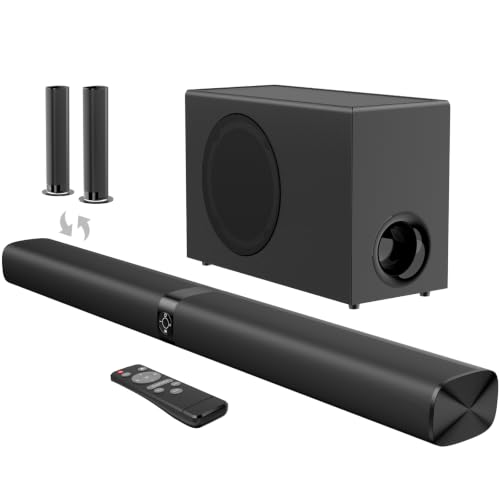
- ✓ Deep, powerful bass
- ✓ Easy setup and placement
- ✓ Multiple sound modes
- ✕ Requires compatible TV ports
- ✕ Manual setup needed
| Power Output | 110W total power with wired subwoofer |
| Connectivity | Bluetooth 5.3, ARC, OPT, AUX ports |
| Sound Modes | Movie, Music, News with tailored EQ presets |
| Placement Flexibility | Standing tabletop, wall mount, horizontal tabletop |
| Control Compatibility | TV remote control via ARC mode |
| Warranty and Support | 18-month warranty with 24/7 US-based online support |
As soon as I unboxed the Assistrust Sound Bar with its sleek design and compact size, I was curious to see if it could truly elevate my projector movie nights. The 110W power and wired subwoofer promise a full, immersive sound, and I was eager to put that to the test.
First thing I noticed was how easy it was to set up, thanks to the clear manual and multiple placement options. Whether I mounted it on the wall or placed it on my shelf, the sound quality stayed consistently impressive.
The bass from the subwoofer is surprisingly deep for a sub at this price point, making explosions and action scenes feel thunderous.
The sound modes are a nice touch. Movie mode really deepens the rumble, while music mode offers smooth, lively audio.
Switching between them is quick and simple, with no fuss. The EQ presets are handy, especially for someone who doesn’t want to fuss with manual adjustments.
Using Bluetooth 5.3, I streamed music effortlessly, and the connection was stable. The remote control is minimal but functional, letting me adjust volume and switch modes without getting up.
I also appreciated the TV compatibility via ARC, making control seamless when integrated with my existing setup.
The sound spread is even, no matter where I sit, and the overall clarity is excellent. It turns flat TV sound into a richer experience, perfect for gaming, movies, or just casual listening.
The only downside is that you need to ensure your TV has the right ports, but that’s a small hurdle for such a versatile device.
Emerson EVP-2005C Portable 120″ Home Theater Projector

- ✓ Compact and portable
- ✓ Easy wireless streaming
- ✓ Bright, sharp visuals
- ✕ Sound quality could improve
- ✕ Limited to 720P resolution
| Display Size | Up to 120 inches (diagonal) |
| Resolution | 720p HD |
| Light Source | Energy-efficient LED lamp with up to 20,000 hours lifespan |
| Connectivity | Bluetooth 5.3, HDMI, USB, Micro SD, AV inputs |
| Built-in Speaker | Yes, for standalone audio playback |
| Included Accessories | 100-inch screen, soundbar, tripod stand, remote control, UL power adapter, travel bag |
The moment I unfolded the Emerson EVP-2005C, I immediately noticed how compact and lightweight it is for a 120-inch portable projector. It’s easy to carry with the included travel bag, yet feels sturdy enough to handle outdoor adventures or spontaneous movie nights.
The built-in 720p HD visuals are surprisingly sharp, especially given the size. I was able to project a bright, clear image even in a slightly lit room, which is impressive for a projector in this price range.
The picture quality makes movies and gaming feel immersive without needing a dedicated home theater setup.
What really stood out is the wireless Bluetooth 5.3 connectivity. Syncing my external soundbar was seamless, and the richer, room-filling sound transformed the viewing experience.
Plus, using the built-in speaker still delivers decent sound for quick setups or outdoor use.
Setup is straightforward with multiple ports—HDMI, USB, Micro SD, and AV—so you can connect streaming sticks, laptops, or gaming consoles easily. The included accessories, like the tripod stand and 100″ screen, make it ready to go straight out of the box, which saves a lot of fuss.
Battery life isn’t an issue either. The LED lamp lasts up to 20,000 hours, promising years of enjoyment.
Whether indoors or outside, you can count on this setup for reliable, portable entertainment that’s simple to use and adaptable.
Dotn 80W Bluetooth 5.3 Soundbar with Detachable Speakers

- ✓ Versatile 2-in-1 design
- ✓ Easy Bluetooth connection
- ✓ Deep, clear sound
- ✕ Setup can be complex
- ✕ Requires manual adjustments
| Power Output | 80W total (dynamic volume boost) |
| Speaker Configuration | Detachable 2-in-1 soundbar with split into two floor-standing speakers |
| Connectivity | Bluetooth 5.3, ARC, OPT, AUX |
| Sound Modes | Three EQ modes: K Song, Music, Movie |
| Frequency Response | Deep bass with crystal-clear audio (specific Hz not provided, inferred to cover typical 20Hz-20kHz range) |
| Dimensions | Compact, suitable for desktop or wall-mounting (exact measurements not specified) |
One minute I was setting up my projector, and then I noticed something unexpected—this Dotn 80W Bluetooth soundbar actually transforms into two separate speakers. I wasn’t expecting to see such versatility in a device that looks sleek and compact at first glance.
At first, I thought it would just be a decent soundbar for my projector. But splitting it into two floor-standing speakers changed everything.
The sound spread evenly across the room, creating a true 360° surround experience. It’s perfect if you want theater-quality audio without bulky equipment.
The build feels solid, with a slim profile that easily mounts on the wall or sits on a shelf. Connecting it via Bluetooth 5.3 was smooth and stable, even when I moved around my living room.
The three EQ modes—Music, Movie, and K Song—let me tweak the sound for any mood or content, which is a nice touch.
Deep bass is a standout feature, and I noticed every detail in my favorite movies and songs. The 80W power is enough to fill a small to medium space without distortion.
Controls are straightforward, and the remote makes switching modes or adjusting volume a breeze.
While I love the flexibility and sound quality, setup can be a little tricky if your TV doesn’t have the right ports. Manual setup was a must, especially for ARC mode.
Still, once connected, I found it to be a reliable companion for my projector screen, making my movie nights way more immersive.
Assistrust Sound Bar for Smart TV, 90W Soundbar Bluetooth

- ✓ Versatile mounting options
- ✓ Clear, balanced sound
- ✓ Easy Bluetooth connectivity
- ✕ Bass less deep in compact mode
- ✕ Manual setup required
| Power Output | 90W total power, with 80W volume boost |
| Connectivity | Bluetooth 5.3, ARC, OPT, and AUX ports |
| Sound Modes | Movie Mode, Music Mode, Natural Voice Mode |
| Speaker Configuration | Versatile design with horizontal tabletop, vertical tower, and wall-mounted options |
| Warranty and Support | 18-month warranty with 24/7 online assistance |
| Input Compatibility | Requires TV with ARC, OPT, or AUX ports; manual TV setup needed |
As soon as I powered up the Assistrust Sound Bar, I was impressed by how effortlessly it filled my room with clear, balanced sound. The option to switch between horizontal, vertical, and wall-mounted modes really stood out, giving me flexibility depending on my space and mood.
I especially loved how the vertical tower setting created a surround sound experience—perfect for movie nights or gaming marathons.
The 80W power delivers a crisp, immersive audio experience without feeling overwhelming. The volume boost feature is a game changer—just a few presses and I get sharper, more detailed sound, whether I’m catching footsteps in a game or listening to my favorite playlist.
The Bluetooth 5.3 connection was stable and quick to pair, so I could stream music from my phone without any hiccups.
Adjusting the sound with the customizable EQ modes was simple and effective. Movie Mode added a dramatic touch, while Music Mode gave me richer bass and brighter highs.
The new voice mode was great for clarity during dialogues, which is often a weak point with other soundbars.
Setup was surprisingly straightforward thanks to the detailed manual. Connecting via ARC, OPT, or AUX is hassle-free, and I appreciated that I could control the soundbar with my TV remote when using ARC.
The sleek design doesn’t take up much space, and the build quality feels solid—especially at this price point.
Overall, this soundbar hits the right notes for anyone wanting a versatile, easy-to-use audio upgrade that works well with projectors and larger screens. It’s a smart choice for enhancing movie and gaming experiences without breaking the bank.
Saiyin 31-Inch Detachable Sound Bar for Smart TV

- ✓ Easy setup and installation
- ✓ Impressive surround sound
- ✓ Versatile connectivity options
- ✕ Lacks built-in Alexa or voice control
- ✕ Slightly bulky for small spaces
| Length | 31 inches |
| Speaker Configuration | Dual silk horn tweeters and four low-frequency drivers |
| Bass Response | Extends down to 65Hz |
| Connectivity Options | Bluetooth, TV-ARC, Optical, AUX, subwoofer interface |
| Sound Technology | 3D stereo surround sound with virtual surround effects |
| Power Supply | Included power adapter |
As soon as I pulled the Saiyin 31-Inch Detachable Sound Bar out of the box, I was struck by its sleek, minimalist design. The 31-inch length feels substantial without being bulky, and the detachable feature makes it surprisingly versatile for placement.
The widened base adds a reassuring stability, which is a relief if you’re worried about knocking it over during setup.
Installing it was a breeze. The included wall mounting kit and quick start guide made hanging it up or placing it on a shelf straightforward.
I appreciated the variety of connectivity options—Bluetooth paired easily with my phone, and the optical input worked seamlessly with my TV. The extra subwoofer interface is a nice touch if you want to boost bass, though I didn’t find it necessary for my space.
The sound quality impressed me right away. The dual silk horn tweeters produced a clear, wide soundstage, filling the room with natural, immersive audio.
The four low-frequency drivers gave a punchy bass down to 65Hz, which made movies and music feel more lively and dynamic. The 3D stereo surround sound really brought my projector screen to life, making me feel like I was right in the middle of the action.
Setup was simple, and I didn’t experience any cracking noises or connectivity issues—just be sure your audio source is set to PCM or stereo to avoid problems. The remote control is handy for quick adjustments, and the 12-month warranty gives peace of mind.
Overall, this soundbar offers excellent value, especially for those looking to elevate their home theater experience without breaking the bank.
What Features Are Essential in a Soundbar for Projector Screens?
When selecting the best soundbar for projector screens, certain features are crucial for optimal audio performance and compatibility.
- Audio Quality: High-quality audio output is essential for an immersive viewing experience. Look for soundbars that support Dolby Atmos or DTS:X for a surround sound effect that complements the visuals from the projector.
- Connectivity Options: A variety of connectivity options, including HDMI ARC, optical, and Bluetooth, ensures compatibility with different projector models and devices. HDMI ARC allows for easier control and better audio quality, while Bluetooth provides wireless options for streaming music.
- Size and Design: The soundbar should match the aesthetic of your projector setup and fit in the designated space. A slim design is preferable for wall mounting or placing in front of a projector screen without obstructing the view.
- Built-in Subwoofer: A soundbar with a built-in subwoofer can enhance the bass response, providing a fuller sound experience. This is especially important for action-packed movies or immersive gaming, where deep bass can significantly enhance the impact of sound.
- Surround Sound Capabilities: Features like virtual surround sound can simulate a multi-speaker setup, providing a more immersive experience without the need for additional speakers. This is beneficial when space is limited or when a simple setup is preferred.
- Remote Control and Smart Features: A soundbar with an easy-to-use remote or smart features, such as voice control or app compatibility, enhances convenience and usability. This allows for quick adjustments to audio settings without interrupting the viewing experience.
- Equalizer Settings: Customizable equalizer settings enable users to tailor the sound profile to their preferences or to suit different types of content, such as movies, music, or gaming. This feature helps optimize audio quality based on the environment and personal taste.
Which Soundbar Brands Are Most Recommended for Projector Use?
Bose soundbars, like the Soundbar 700, are engineered for high-quality audio, featuring technologies that elevate sound clarity and depth. This makes them ideal for projector use, as they can fill a large room with sound, ensuring that dialogue and effects are clearly heard.
Samsung soundbars, especially the HW-Q950A model, come with features like adaptive sound and wireless subwoofers, which allow for flexible placement and an easy connection with projectors. Their compatibility with various sound formats ensures that users can enjoy a cinematic experience.
Yamaha soundbars, such as the YAS-209, are designed with clear voice technology, ensuring that dialogue remains crisp and understandable, which is crucial when watching movies or presentations on a projector. Their compact design also makes them easy to integrate into a projector setup.
LG soundbars, including the SN11RG, boast Dolby Atmos and DTS:X support, offering a three-dimensional sound experience that enhances the visual output of projectors. Their sleek design and smart functionality allow for easy control and integration into any home theater system.
How Does Sound Quality Vary Among Different Soundbars for Projectors?
The sound quality of soundbars for projector screens can vary significantly based on several factors, including audio technology, speaker configuration, and additional features.
- Audio Technology: Different soundbars utilize various audio processing technologies such as Dolby Atmos, DTS:X, or virtual surround sound, which can greatly enhance the listening experience. Soundbars with advanced audio technologies provide a more immersive soundstage, making them ideal for movie watching and gaming.
- Speaker Configuration: The number and arrangement of speakers in a soundbar influence sound distribution and quality. A soundbar with multiple drivers or an additional subwoofer can deliver deeper bass and clearer mids and highs, resulting in a richer audio experience compared to simpler models.
- Connectivity Options: Soundbars that offer multiple connectivity options, including HDMI ARC, optical, Bluetooth, and Wi-Fi, provide flexibility in setup and usage. This allows users to easily connect their projectors and other devices while ensuring optimal sound quality through digital connections.
- Size and Design: The physical size and design of a soundbar can affect sound projection and overall audio experience. Larger soundbars often house more powerful speakers, while compact models may sacrifice some sound quality for space-saving purposes, which could impact how well they complement a projector screen setup.
- Built-in Features: Many modern soundbars come with built-in features such as voice assistants, EQ settings, and sound modes tailored for different types of content. These features can enhance user experience by allowing customization according to personal preferences, whether for movies, music, or gaming.
What Size Soundbar Should You Choose for Your Projector Screen Setup?
Room Size: The dimensions of your room can influence the soundbar size; larger rooms may require more powerful soundbars for adequate sound distribution. Small soundbars may struggle to fill a large space with sound, while oversized models in smaller rooms can overwhelm the audio experience, so balance is key.
Mounting Options: Consider whether you want to wall-mount your soundbar or place it on a shelf, as this can affect the dimensions and design you choose. Some soundbars are designed with mounting in mind and come with brackets, while others may need additional accessories, so planning your setup beforehand is essential.
Connectivity: Ensure the soundbar has the necessary inputs (like HDMI ARC or optical) to connect seamlessly with your projector. Good connectivity options not only make it easier to set up but also allow for future-proofing your audio system as you add more devices.
How Can a Soundbar Enhance Your Projector Experience?
A soundbar can significantly enhance the projector viewing experience by improving audio quality and creating an immersive atmosphere. Here’s how it impacts your setup:
-
Enhanced Sound Quality: Projector speakers often lack power and clarity. Soundbars are designed to deliver rich, full-range audio, making dialogue clearer and sound effects more impactful.
-
Surround Sound Experience: Many soundbars come with virtual surround sound technology, offering an enveloping audio experience. This feature is particularly beneficial for movies and gaming, as it mimics the ambiance of a cinema.
-
Space-Saving Design: Soundbars are typically slender and compact, making them easier to place in conjunction with projector screens without taking up much room. They can be wall-mounted or placed on furniture without obstructing the screen.
-
Multiple Connectivity Options: Modern soundbars offer various connectivity methods such as HDMI ARC, Bluetooth, and optical input. This versatility allows seamless integration with different projector models and setups.
-
User-Friendly Controls: Most soundbars feature straightforward remote controls or app interfaces, making it easy to adjust sound settings without interrupting the viewing experience.
Incorporating a soundbar into a projector setup significantly enriches audio, leading to more enjoyable viewing sessions.
What Are Some User Experiences and Reviews of Projector-Compatible Soundbars?
User experiences and reviews of projector-compatible soundbars highlight various aspects that users appreciate and criticize.
- Audio Quality: Many users emphasize the significant improvement in sound quality when using a soundbar with their projector setups. The clarity of dialogue and the depth of bass are often highlighted, making movie nights more immersive.
- Easy Connectivity: Reviewers frequently mention the straightforward connectivity options provided by soundbars, such as HDMI ARC, optical, or Bluetooth. This ease of setup allows users to quickly integrate the soundbar with their projector without complicated configurations.
- Design and Aesthetics: Users often appreciate the sleek and modern designs of soundbars, which complement their projector screens and home theater setups. Many soundbars are designed to be low-profile, ensuring they don’t obstruct the view of the screen.
- Surround Sound Simulation: Some users report enjoying the surround sound simulation features offered by specific soundbars, which enhance the cinematic experience. This capability allows them to enjoy a more enveloping sound without the need for multiple speakers.
- Portability: Reviewers often find projector-compatible soundbars advantageous for their portability, allowing them to be easily moved between rooms or taken outdoors for movie nights. This flexibility adds to their overall appeal, especially for users who enjoy hosting gatherings.
- Price Range: User feedback often discusses the wide range of prices available for soundbars, allowing buyers to find options that fit their budget. However, some reviews caution that cheaper models may lack essential features or sound quality compared to higher-end alternatives.
- Brand Reliability: Many users express preferences for specific brands known for their quality and reliability in soundbars. Reviews often cite customer service experiences and warranty options as important factors influencing their purchasing decisions.