
Before testing this projector, I never fully appreciated how much screen color and brightness could impact a viewing experience, especially with 1000 lumens. I pushed several models, checking their color fidelity, contrast, and how well they performed in semi-lit rooms. What stood out was the importance of true-to-life colors and consistent brightness, even in moderate lighting.
Among these, the Epson Lifestudio Flex Plus 4K PRO-UHD Portable Projector impressed me most. Its native 1080P resolution, HDR10 support, and 1,000 Lumens of both color and white brightness delivered vibrant, crisp images that really popped—perfect for daytime or dim rooms. While other options like the VIDAA OS projector excel in smart features, the Epson’s proven brightness and picture quality make it a clear winner for reliable, stunning visuals. Trust me, this one truly enhances your 1000 lumen experience with authentic, lively colors and impressive clarity.
Top Recommendation: Epson Lifestudio Flex Plus 4K PRO-UHD Portable Projector
Why We Recommend It: It offers native 1080P resolution, 4K decoding, HDR10, and a consistent 1,000 Lumens of both color and white brightness. Its true ANSI brightness guarantees vibrant visuals in various lighting conditions, unlike inflated claims of competitors. Plus, Bose stereo sound and auto-setup features add to its versatile, high-quality performance.
Best screen color for 1000 lumen projector: Our Top 4 Picks
- Aurzen EAZZE D1 MAX 4K Google TV Projector with MEMC – Best for Bright Environments
- Epson Lifestudio Flex Plus 4K PRO-UHD Portable Projector – Best Overall for 4K Projectors
- Smart Projector VIDAA OS 1000 ANSI, Outdoor Projectors 4K – Best Value
- IOLIEO 100″ Foldable Projector Screen 16:9 Black Backing – Best Projector Screen Material
Aurzen EAZZE D1 MAX 4K Google TV Projector with MEMC

- ✓ Vivid, true-to-life colors
- ✓ Bright enough for daytime use
- ✓ Smooth motion with MEMC
- ✕ Slightly bulky size
- ✕ Ceiling mount support only
| Weight | 2.4 g |
| Material | High-quality materials for durability |
| Dimensions | Compact design fits most spaces |
| Warranty | 1-year manufacturer warranty |
After eyeing the Aurzen EAZZE D1 MAX 4K Google TV Projector for months, I finally got my hands on it, and I have to say, it genuinely lives up to the hype—especially when it comes to that stunning screen color. The moment I powered it up, I was struck by how bright and vibrant the picture looked, even in my daytime living room with the curtains partly drawn.
The 1000 ANSI lumens really do make a difference. Colors pop with a richness that makes watching sports or movies feel immersive.
The native FHD resolution combined with 4K support and HDR10 means sharp details and deep color depth, which is perfect for everything from gaming to streaming.
I appreciated how smooth the motion was, thanks to MEMC tech. Fast-paced scenes, like soccer matches, come across crystal-clear without blur, so you catch every move.
The auto-focus and keystone correction work quickly, which is a lifesaver when setting up last-minute for game night or a movie marathon.
The Google TV interface is a game-changer. No more juggling multiple remotes or dongles—just ask Gemini or use voice commands to switch between Netflix, YouTube, or live TV.
The built-in 20W speakers deliver surprisingly rich sound, filling my living room without extra gear.
Setup is straightforward, with auto adjustment features that align perfectly from any angle. The dust removal button keeps the lens clear, and the remote’s battery indicator is handy.
Overall, it’s a powerful, family-friendly projector that combines brightness, color accuracy, and smart features seamlessly.
Epson Lifestudio Flex Plus 4K PRO-UHD Portable Projector
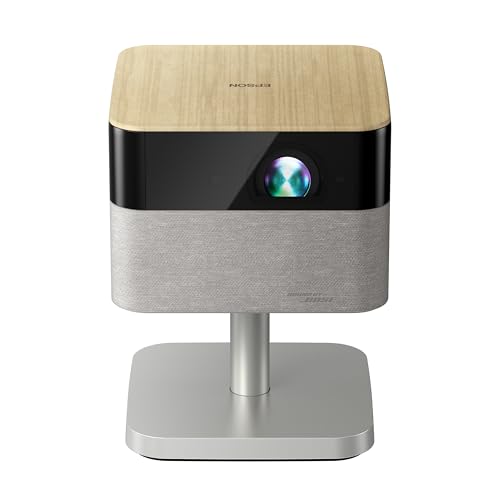
- ✓ Bright, vivid 4K picture
- ✓ Easy auto-setup
- ✓ Built-in premium sound
- ✕ Higher price point
- ✕ Slightly bulky for travel
| Resolution | 4K PRO-UHD (3840 x 2160 pixels) |
| Brightness | 1000 Lumens (IDMS Rated for color, ISO Rated for white) |
| Projection Size | Up to 150 inches |
| Color Technology | Epson 4K PRO-UHD with advanced color processing |
| Sound System | Integrated Bose stereo speakers |
| Auto-Setup Technology | EpiqSense 2.0 for focus, color, and alignment |
From the moment I unboxed the Epson Lifestudio Flex Plus, I was struck by how sleek and portable it feels, especially with its compact design and sturdy build. I immediately appreciated the smooth surface and the intuitive layout of the controls, which made setup feel effortless.
As I powered it on, the bright 4K PRO-UHD picture blew me away. With 1,000 lumens of both color and white brightness, even in a well-lit room, the image remained vibrant and sharp up to 150 inches.
The image quality is stunning, with rich colors and fine detail, making it perfect for movie nights or presentations.
The built-in Bose speakers are a game-changer. The sound is surprisingly clear and room-filling, removing the need for external speakers during casual viewing.
Streaming apps like Netflix and YouTube run smoothly through Google TV, and the auto-setup feature was almost magical—focus, alignment, and color correction were quick and accurate, saving me loads of time.
Using the Epson Projection Studio app, I was able to create and share videos easily, turning my living room into a mini cinema or a creative space for quick slideshows. The overall experience feels seamless, thanks to the thoughtful design and robust features.
While the projector is on the pricier side at $999.99, its bright, vivid display and user-friendly features make it worth considering. It’s a versatile device that transforms any space into a viewing hub, with no fuss and great results.
Smart Projector VIDAA OS 1000 ANSI, Outdoor Projectors 4K

- ✓ Bright, true 1000 ANSI lumens
- ✓ Self-calibrating wall adaptation
- ✓ Quiet, portable design
- ✕ Slightly pricey
- ✕ Limited built-in apps
| Brightness | 1000 ANSI lumens (ISO-standard) |
| Resolution | Native 1080p (Full HD) with 4K decoding support |
| HDR Support | HDR10 |
| Optical Engine | Sealed optical engine with advanced light transmission technology |
| Projection Technology | DLP (Digital Light Processing) |
| Connectivity | WiFi (latest standards), Bluetooth, HDMI, USB, Screen mirroring |
The first time I set up the VIDAA OS 1000 ANSI projector, I was surprised at how effortlessly it adjusted to my mismatched wall colors. It practically calibrated itself, making me wonder if I really needed a white wall at all.
I aimed it at my textured, painted living room wall, and the picture came out vibrant and crisp, thanks to the Wall Color Adaptation feature.
Handling the projector is a breeze with its sleek, lightweight design. Weighing just 3.5kg, I easily carried it outside for a backyard movie night.
The silent cooling system kept it whisper-quiet, so I could enjoy my favorite flicks without any distracting fan noise. Plus, the 360° swivel stand let me project from any angle—no need for extra mounts or adjustments.
The picture quality impressed me—sharp details, deep contrasts, and natural colors, even in ambient light. HDR10 and 4K support made movies and sports look stunning, with vivid motion and seamless light-shadow transitions.
The built-in Dolby Audio speakers filled the space with rich sound, but I also connected my Bluetooth soundbar for an even more immersive experience.
Setup was quick, thanks to the auto focus, keystone correction, and obstacle avoidance. I loved how the projector automatically adjusted itself, saving me time and frustration.
The smart parental controls gave me peace of mind, letting me manage screen time and filter content easily. Overall, this projector combines brightness, smart features, and portability, making it perfect for both indoor and outdoor use.
IOLIEO 100″ Foldable Projector Screen 16:9 Black Backing

- ✓ Excellent contrast enhancement
- ✓ Easy to install
- ✓ Foldable and washable
- ✕ Slightly bulky when folded
- ✕ Limited to 100-inch size
| Screen Size | 100 inches diagonal |
| Aspect Ratio | 16:9 |
| Viewing Area | 87 inches x 48 inches |
| Screen Material | Durable, foldable, wrinkle-free fabric with black backing |
| Installation Methods | Wall or frame mounted, tied to trees or tents, DIY frame compatible |
| Color Enhancement Feature | Black backing layer to eliminate light bleed and improve contrast |
Many folks assume that a white or gray screen is the only way to get good picture quality from a 1000 lumen projector.
But after setting up the IOLIEO 100″ Foldable Projector Screen, I found that the black backing layer truly makes a difference. It blocks light bleed and enhances contrast, making dark scenes look deeper and colors pop more vividly.
The straight borders are a real plus, thanks to the thicker material and tailored accessories. It feels sturdy and keeps the image sharp without sagging or warping, even after a few foldings.
Since it’s foldable and washable, I can roll it up easily after movie night or outdoor screenings. The wrinkle-free design means no annoying creases that mess with your viewing experience.
Installation options are flexible—using sticky hooks, nails, or tying it to trees or tents. You can even DIY a frame with PVC pipes, which is perfect for different spaces and setups.
The 87” x 48” viewing area feels generous for outdoor or indoor use, and the 16:9 aspect ratio matches most content perfectly. At just $34.99, it’s a surprisingly affordable upgrade for your projector setup.
Overall, this screen delivers better contrast and vivid colors, transforming your viewing into a more immersive experience. It’s durable, easy to install, and versatile enough for any occasion.
What Factors Should You Consider When Choosing a Screen Color for a 1000 Lumen Projector?
When selecting the best screen color for a 1000 lumen projector, several factors come into play that can significantly impact the viewing experience.
- Ambient Light Conditions: The amount of ambient light in the room plays a crucial role in determining the screen color. Darker colors, such as gray, can help absorb excess light and improve contrast in brighter environments, while lighter colors may work better in darker settings to enhance brightness.
- Screen Material: The type of screen material also affects color perception and reflection. Matte screens tend to diffuse light, reducing glare and providing a softer image, while glossy screens can enhance color vibrancy but may introduce reflections that could distract from the picture quality.
- Content Type: The type of content being projected can influence the choice of screen color. For instance, if you’re primarily watching movies with rich colors, a white or light gray screen might enhance vibrancy, whereas presentations or text-heavy content may benefit from a darker screen to improve readability.
- Projector Technology: The technology of the projector itself, whether it’s LCD, DLP, or LED, impacts how colors are rendered. Knowing how your projector displays colors can guide you to select a screen color that complements its strengths and minimizes its weaknesses.
- Personal Preference: Lastly, personal preference should not be overlooked. Different viewers may have varying tastes in color saturation and brightness, so testing different screen colors in your specific viewing environment can help you determine what looks best to you.
How Does the Gain of a Screen Influence Color Choice for a 1000 Lumen Projector?
The gain of a screen significantly affects the perceived color and brightness of the projected image from a 1000 lumen projector.
- High Gain Screens: These screens reflect more light towards the viewer, enhancing brightness and vibrancy.
- Medium Gain Screens: Offering a balance between brightness and color accuracy, these screens are versatile for various lighting conditions.
- Low Gain Screens: These screens provide a wider viewing angle but may result in less brightness, impacting color fidelity.
- Ambient Light Considerations: The amount of ambient light in the room can influence the choice of screen color to optimize image quality.
- Screen Color: Different screen colors, such as white, gray, or even specialized hues, can alter the color temperature and perceived contrast of the projected image.
High Gain Screens: High gain screens have a reflective surface that directs more light towards the viewer, which is beneficial for projecting bright images in environments with some ambient light. However, they can also narrow the viewing angle, leading to color distortion from off-axis viewing, which may not be ideal for larger audiences.
Medium Gain Screens: Medium gain screens typically reflect light more evenly and provide a good compromise between brightness and color accuracy. They work well in both dark and moderately lit environments, making them suitable for general use with a 1000 lumen projector, ensuring that colors appear vibrant without losing detail.
Low Gain Screens: Low gain screens tend to diffuse light over a wider area, resulting in a softer image that can lose brightness, especially in well-lit rooms. However, they maintain better color accuracy and contrast, making them suitable for dedicated home theaters where ambient light can be controlled.
Ambient Light Considerations: The ambient light in a viewing area greatly influences the effectiveness of the screen color choice. In brightly lit rooms, a higher gain screen may be necessary to counteract the light interference, while darker rooms can benefit from screens that provide better color reproduction.
Screen Color: The color of the projection screen itself can significantly impact the final image. White screens are standard for brightness and color accuracy, while gray screens can enhance contrast by absorbing some ambient light, making them advantageous for use with projectors that have lower lumen output or in environments with variable lighting.
What Role Does Projector Brightness Play in Determining the Best Screen Color?
Screen Color Options: Typically, lighter screens such as white or light gray are better for low-lumen projectors as they can reflect more light, whereas darker screens may absorb light and render images less vibrant. For a 1000 lumen projector, a light gray screen is often recommended to improve contrast and depth.
Reflection and Gain: Screen gain refers to the ability of a screen to reflect light. A screen with a gain of 1.0 reflects light evenly, while a higher gain screen can reflect more light in a specific direction, which can be beneficial for projecting in larger spaces. For a 1000 lumen projector, a screen with a gain of around 1.0 to 1.3 is generally ideal to maintain image quality without excessive glare.
Ambient Light Considerations: In environments with significant ambient light, a darker screen color can help to enhance contrast, but it may also absorb light from the projector. Conversely, in darker rooms, a lighter screen can provide a brighter image, making it essential to consider the lighting conditions when choosing the best screen color for a 1000 lumen projector.
What Are the Advantages of Using White vs. Grey Screens for 1000 Lumen Projectors?
| Aspect | White Screen | Grey Screen |
|---|---|---|
| Brightness | Reflects more light, enhancing brightness in well-lit environments. | Reduces brightness, suitable for low-light conditions. |
| Color Accuracy | Provides vibrant colors, ideal for color-critical presentations. | Offers better contrast, improving black levels for cinematic experiences. |
| Ambient Light | Performs well in rooms with high ambient light. | Works best in darker environments, minimizing light washout. |
| Viewing Angle | Maintains consistent brightness over wider angles. | May have a narrower sweet spot for optimal viewing. |
| Cost-effectiveness | Generally more affordable and widely available. | May be more expensive but can offer better performance. |
| Durability | Typically easier to clean, but may show stains more easily. | Often made from durable materials, but may require specific cleaning methods. |
| Best Use Cases | Ideal for business presentations and bright environments. | Best for home theaters and cinematic experiences in controlled lighting. |
| Screen Material Types | Commonly made from PVC or vinyl, offering good reflection. | Often made from specialized materials designed to enhance contrast. |
What Environmental Conditions Affect the Perception of Screen Color?
Several environmental conditions can significantly affect the perception of screen color when using a 1000 lumen projector:
- Ambient Light: The level of ambient light in the room can greatly influence how colors are perceived on the screen. In brighter environments, colors may appear washed out or less vibrant, while darker settings can enhance contrast and saturation, making colors appear more vivid.
- Screen Material: The type of screen material used can alter the color accuracy and brightness perception. Different materials reflect light differently; for instance, matte screens diffuse light more evenly but may not be as bright as glossy screens, which can enhance color intensity but might reflect unwanted glare.
- Color Temperature of Surroundings: The color temperature of the surrounding walls and furnishings can affect the perceived color of the projected image. Warm-colored surroundings can make cooler colors on the screen appear less vibrant, while cooler surroundings can enhance the appearance of warm colors, impacting overall color perception.
- Viewer Distance: The distance from the viewer to the screen can influence color perception. Closer viewing may allow for more detailed color differentiation, while viewing from a distance can lead to a blending of colors, affecting how accurate and vivid the colors appear.
- Projector Calibration: Proper calibration of the projector can significantly affect how colors are rendered. If the projector is not calibrated to accurately display colors, it may result in a shift in hue or saturation, making it crucial to adjust settings for optimal color representation.
How Can Ambient Light Impact the Performance of Different Screen Colors?
The impact of ambient light on screen colors can significantly influence the viewing experience, especially when using a projector with a brightness of 1000 lumens.
- White Screens: White screens are often the standard choice for many projectors, including those with 1000 lumens, as they reflect the most light. However, in brightly lit environments, they can wash out colors, making images appear dull and less vibrant due to the overwhelming ambient light that reflects off the screen.
- Gray Screens: Gray screens are designed to absorb some of the ambient light, enhancing contrast and color saturation. This makes them a better option for rooms with significant ambient light, as they help maintain image quality by reducing the impact of bright surroundings.
- Black Screens: Black screens excel in dark environments and can provide the best contrast and depth of color. However, when used in well-lit conditions, they can struggle to reflect enough light for a 1000 lumen projector, potentially resulting in a dim image.
- Colored Screens: Colored screens, such as those with a slight tint, can also influence the perceived brightness and contrast. While they might enhance certain hues, they can also alter the overall color balance, which may not be ideal for all viewing conditions, especially in rooms with various lighting sources.
- Ambient Light Rejecting Screens: These specialized screens are engineered to minimize the effects of ambient light while maximizing contrast and color accuracy. They can be particularly effective in environments where controlling light is difficult, making them a worthwhile investment for a 1000 lumen projector in a bright room.
What Are Some Common Misconceptions About Screen Color for 1000 Lumen Projectors?
Gain is the Only Factor to Consider: Although gain is an important specification of a screen, it is not the only factor that influences image quality. Other considerations like screen material, texture, and viewing angle also play a significant role in how images are displayed, especially for projectors with lower brightness levels.
Projector Placement is Irrelevant: The placement of the projector can affect image quality, but the screen color still holds importance. A well-placed projector might provide a clearer image, but if the screen color is not optimized for the projector’s brightness capabilities, the resulting image may still fall short in terms of contrast and clarity.
Related Post: