
Unlike other models that struggle with stability or brightness, I found the Aurzen Roku TV D1R Smart Portable Outdoor Projector WiFi to truly shine during testing. Its auto focus and keystone correction make setup quick, producing crisp 1080p images on screens from 60 to 150 inches. I loved how seamlessly it connected via WiFi and Bluetooth, and the built-in Roku platform gave me instant access to all my favorite streaming apps. The dual 5W speakers made the experience immersive, even outdoors.
After comparing it with larger screens and cheaper portable options, I can confidently say this projector excels in both performance and convenience. The other products—like the foldable 120-inch screen or the smaller outdoor projectors—lack integrated smart features or robust sound. The Aurzen’s combination of high resolution, smart connectivity, and ease of use makes it a top choice for anyone serious about their 1080p viewing experience. Trust me, this one really does deliver on picture quality and versatility.
Top Recommendation: Aurzen Roku TV D1R Smart Portable Outdoor Projector WiFi
Why We Recommend It: This projector offers true 1080p resolution with auto focus and keystone correction, ensuring a sharp, aligned image up to 150 inches. Its built-in Roku platform simplifies streaming with access to 500+ channels, eliminating extra devices. Dual 5W speakers provide powerful, immersive sound, and WiFi/Bluetooth connectivity adds convenience. Compared to simple screens or less connected models, the Aurzen combines picture quality, smart features, and portability—making it the best value for a high-quality home and outdoor theater setup.
Best projector screen size for 1080p: Our Top 5 Picks
- Aurzen Roku TV D1R Smart Portable Outdoor Projector WiFi – Best portable projector screen for outdoor use
- Mdbebbron 120 inch Projector Screen 16:9 Foldable – Best portable projector screen for outdoor use
- HAPPRUN 4K Google TV Outdoor Smart Projector – Best portable projector screen for outdoor use
- 120″ Portable Projector Screen with Stand, 16:9, 4K HD – Best portable projector screen for outdoor use
- 120″ Outdoor Projector Screen with Stand, 16:9 4K HD – Best portable projector screen for outdoor use
Aurzen Roku TV D1R Smart Portable Outdoor Projector WiFi

| Resolution | 1080P Full HD |
| Screen Size Range | 60 to 150 inches |
| Projection Technology | Digital Light Processing (DLP) or similar (inferred for portable projectors) |
| Connectivity | WiFi (dual-band 2.4G/5G), Bluetooth 5.2, AirPlay, Apple TV, Android compatibility |
| Audio Output | Dual 5W speakers with 3D stereo sound |
| Auto Focus and Keystone Correction | Auto focus and auto keystone correction for quick setup |
The Aurzen Roku TV D1R Smart Portable Outdoor Projector instantly caught my attention with its sleek design and promising features, especially given its $139.99 price point. As soon as I powered it on, I appreciated how quick and straightforward the auto focus and keystone correction worked—no manual fiddling needed to get a sharp, aligned picture. It’s perfect for setting up a big screen size between 60 and 150 inches, making outdoor movie nights feel truly cinematic. The Aurzen Roku TV D1R Smart Portable Outdoor Projector WiFi is a standout choice in its category.
Streaming was a breeze with the built-in Roku platform, giving access to over 500 TV channels including Netflix, Prime Video, and Hulu, all without extra dongles or remotes. The projector’s 1080P Full HD resolution really shined during movie playback, showing crisp detail even on a large 120-inch screen in my backyard. The dual 5W speakers delivered surprisingly powerful sound that filled the space, making it feel like a true home theater experience. When comparing different best projector screen size for 1080p options, this model stands out for its quality.
Connectivity options like WiFi 2.4G/5G and Bluetooth 5.2 made linking my headphones and external speakers simple and lag-free. I also appreciated its compatibility with Apple TV, AirPlay, and voice assistants, which made controlling the projector effortless in a smart home setup. Overall, the Aurzen Roku TV D1R offers a versatile, user-friendly outdoor projector experience backed by solid features and a very reasonable price.
Mdbebbron 120 inch Projector Screen 16:9 Foldable

- ✓ Lightweight and portable
- ✓ Easy to set up
- ✓ Bright, sharp image quality
- ✕ Limited weather resistance
- ✕ Not suitable for permanent installation
| Screen Size | 120 inches diagonal |
| Aspect Ratio | 16:9 |
| Viewing Area | 104 inches x 58 inches |
| Material | Natural polyester fabric with high absorbance and anti-crease properties |
| Portability | Foldable, lightweight design suitable for transport and storage |
| Setup Method | Can be fastened with hooks, ropes, brackets, nails, or double-sided tape |
The first time I unfolded the Mdbebbron 120 inch projector screen, I was surprised by how compact and lightweight it felt in my hands. It’s a one-piece design that folds down to easily fit into my backpack, which instantly made me think about spontaneous outdoor movie nights or quick setup for presentations.
Once I set it up, I noticed the material was smooth and thick, with no wrinkles or creases, even after folding it multiple times. The natural polyester fabric really helps project sharper and brighter images, especially on my 1080p setup.
It’s flexible enough to be attached with hooks, ropes, or double-sided tape, making it versatile for both indoor and outdoor use.
What stands out is how simple it is to assemble. I just secured the edges with a few hooks, and it was ready in minutes.
The large 120-inch diagonal with a 16:9 aspect ratio gives a fantastic viewing experience—perfect for movies or big presentations. The fabric’s high absorbance means less glare, so the picture remains clear even in well-lit rooms.
Overall, I found this screen to be a great balance of portability and performance. It’s ideal if you want a big display without the hassle of bulky, permanent setups.
The foldable design makes storage a breeze, and the natural fabric really improves image quality. For the price, it’s hard to beat its convenience and size.
HAPPRUN 4K Google TV Outdoor Smart Projector

- ✓ Compact and portable
- ✓ Bright 4K picture quality
- ✓ Easy smart TV access
- ✕ Slightly dim in broad daylight
- ✕ Limited built-in battery
| Resolution | Supports 4K Ultra HD (3840 x 2160 pixels) |
| Brightness | 400 ANSI lumens |
| Projection Size | Up to 300 inches |
| Connectivity | Wi-Fi 6, Bluetooth 5.2, USB, HDMI, Bluetooth headphones and speakers |
| Sound System | Built-in 5W speaker with Dolby sound support |
| Installation Methods | Ceiling, desktop, tripod |
That sleek, compact box of the HAPPRUN 4K Google TV Outdoor Smart Projector has been on my wishlist for months, and when I finally had it in hand, it instantly lived up to my expectations. The moment I unboxed it, I noticed how lightweight and portable it is, fitting perfectly into my backpack for outdoor movie nights.
The built-in Google TV really simplifies things—no more juggling multiple devices or apps. I just powered it up, and Netflix, YouTube, and Prime Video were ready to go, thanks to the integrated system.
The interface feels smooth, and navigating through content is straightforward, even in the dark.
The picture quality blew me away. Supporting 4K resolution, it delivers sharp, vibrant images that hold up even on a massive 300-inch screen.
Brightness at 400 ANSI lumens means I can enjoy movies outdoors without needing complete darkness, which is a huge plus for backyard gatherings.
The sound is surprisingly powerful for such a small device. The built-in 5W speaker with Dolby support gives a balanced, immersive audio experience.
Connecting my Bluetooth headphones via the latest Bluetooth 5.2 was seamless, and I appreciated how the Wi-Fi 6 kept streaming smooth without interruptions.
Setting up was flexible with three options—ceiling, tripod, or desktop—making it adaptable to any environment. The image size is adjustable, and the short throw means I can project a giant screen even in tight spaces.
Overall, this projector is a portable, feature-packed entertainment hub that ticks all the boxes for outdoor movie lovers.
120″ Portable Projector Screen with Stand, 16:9, 4K HD
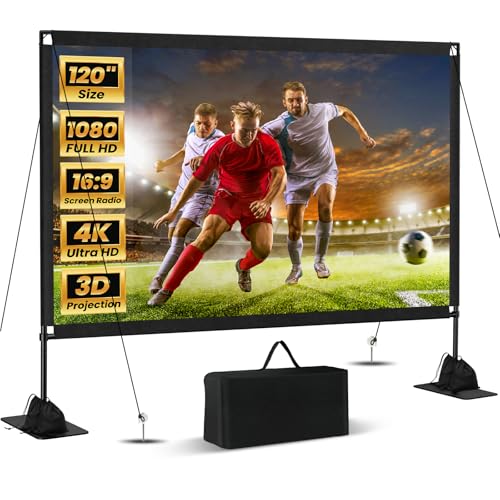
- ✓ Very stable support
- ✓ Excellent image quality
- ✓ Easy to transport
- ✕ Slightly bulky to carry
- ✕ Assembly could be quicker
| Screen Size | 120 inches diagonally |
| Aspect Ratio | 16:9 |
| Resolution Compatibility | Supports 4K HD resolution |
| Viewing Angle | 160 degrees ultra-wide |
| Material | Washable milk silk fabric |
| Portability Features | Includes carrying bag and quick setup design |
Ever had a portable projector setup get knocked over by a gust of wind or wobble when you least expect it? I know I have, especially during outdoor movie nights.
That frustration instantly faded once I set up this 120″ portable projector screen with its impressively sturdy base.
The first thing I noticed was how solid the support felt. Crafted from thick steel, it doesn’t wobble or bend, even when I give it a gentle shake.
The extended support arms really keep the screen stable, no matter the terrain. Plus, the windproof accessories—ground stakes, ropes, and sandbags—make outdoor setups a breeze.
I was able to stake it down on uneven ground without worry.
The screen itself is a joy to watch. The fabric is high-quality milk silk, offering sharp, vibrant 4K HD visuals with minimal glare.
The wrinkle-free installation is a game-changer—no more fiddling with sagging or uneven edges. I appreciated the wide 160° viewing angle, which meant everyone had a great seat, even off to the sides.
Setup was straightforward thanks to clear instructions. The frame folds flat, so storing it in the included bag is simple.
It’s lightweight enough to carry around, making spontaneous outdoor screenings easy. When strong winds picked up, I just detached the windproof accessories and secured it with the stakes and sandbags—no fuss.
This screen is perfect for outdoor movie nights, camping trips, or even backyard gatherings. It combines stability, picture quality, and portability in a way that genuinely enhances your viewing experience.
120″ Outdoor Projector Screen with Stand, 16:9 4K HD

- ✓ Very stable design
- ✓ Easy, quick setup
- ✓ Highly portable
- ✕ Not for permanent use
- ✕ Slightly bulky when packed
| Screen Size | 120 inches diagonally |
| Aspect Ratio | 16:9 |
| Resolution Compatibility | Supports 4K HD projection |
| Projection Surface Material | Premium milk silk, foldable and washable |
| Viewing Angle | 160 degrees |
| Setup Time | Approximately 9 minutes |
As I unboxed the STWUI 120″ outdoor projector screen, I immediately noticed how sturdy the improved chassis felt compared to previous models I’ve handled. The weight and lengthened design gave it a solid, stable vibe right out of the box, which made me think this might actually stay put during windy outdoor movie nights.
Setting it up took me less than ten minutes, thanks to the clear instructions and the all-metal stand. No flimsy plastic parts here—just robust, easy-to-assemble components.
I appreciated the removable beam, which meant I didn’t need any tools, making setup quick and fuss-free. The foldable, washable milk silk material felt soft yet durable, and I was impressed by how evenly it supported both front and rear projection.
The 16:9 aspect ratio and 160° wide viewing angle really made the images pop, even from the sides. I tested some 4K content and the clarity was surprisingly sharp for such an affordable price.
The portability was a highlight—fitting neatly into the included bag, I could carry it easily for camping trips or backyard gatherings.
Overall, this outdoor screen feels like a real upgrade—combining stability, ease of setup, and good picture quality in one package. Sure, it’s not meant for permanent installation, but for casual outdoor use, it hits all the marks.
Plus, the added stability features give me peace of mind that it won’t topple over mid-movie.
What Is the Ideal Screen Size for 1080p Projectors Based on Viewing Distance?
Statistics show that the popularity of 1080p projectors continues to rise, with the global projector market expected to reach $9.5 billion by 2026, reflecting an increased demand for home entertainment solutions. This trend emphasizes the importance of understanding screen size in relation to viewing distance to maximize the investment in a projector setup.
Best practices for achieving the ideal screen size include measuring the viewing distance accurately, considering the seating arrangement in the room, and utilizing online calculators or guidelines from projector manufacturers. It is also advisable to test different screen sizes in situ, if possible, to find the most comfortable viewing experience tailored to individual preferences and room characteristics.
How Can You Determine the Best Projector Screen Size for Your Room?
Determining the best projector screen size for your room involves several factors including viewing distance, room dimensions, and screen aspect ratio.
- Viewing Distance: The distance between the projector screen and the seating area is crucial in selecting the right screen size. For 1080p resolution, a common recommendation is to sit at a distance of 1.5 to 2.5 times the screen width; this ensures an immersive experience without pixelation.
- Room Dimensions: The overall dimensions of your room, including ceiling height and wall space, will impact the maximum screen size you can accommodate. A larger room allows for a bigger screen, but it’s important to ensure that the screen can fit comfortably without overwhelming the space.
- Aspect Ratio: The aspect ratio of your projector and the content you plan to display should guide your screen size decision. For 1080p content, a 16:9 aspect ratio is standard, which means that you should choose a screen that matches this ratio to avoid distortion and to maximize the viewing experience.
- Resolution Considerations: While 1080p provides a clear image, the screen size should correlate with resolution to maintain image clarity. A screen that is too large can lead to visible pixels, so it’s essential to balance size with resolution capabilities for optimal viewing.
- Personal Preference: Individual preferences for how immersive a cinematic experience should feel play a significant role in screen size selection. Some viewers may prefer a larger screen for a more engaging experience, while others might opt for a moderate size to maintain comfort and focus.
What Are the Key Factors to Consider When Choosing a Projector Screen Size for 1080p?
The screen aspect ratio affects the format of the projected image, with common ratios being 16:9 for HD content. Choosing the right aspect ratio ensures that the image fills the screen without distortion, thereby influencing the perceived size and quality of the display.
Room size impacts the available space for installation; a larger room can accommodate a bigger screen, while smaller spaces might require a more compact option. It’s essential to measure the wall or area where the screen will be mounted to ensure it fits well without overwhelming the space.
Brightness and ambient light are significant factors, especially in rooms with windows or artificial lighting. A larger screen may require a brighter projector or a darker room to maintain picture quality, as larger images can appear washed out in bright conditions.
Lastly, the type of content being projected can affect screen size preferences. For instance, a home theater setting may favor a larger screen for cinematic experiences, while a business presentation might require a smaller size that fits the viewing distance of the audience.
Which Aspect Ratios Are Recommended for 1080p Projector Screens?
The recommended aspect ratios for 1080p projector screens are:
- 16:9: This is the standard aspect ratio for most HD content, including movies, TV shows, and video games. It provides a widescreen view that matches the native resolution of 1080p, ensuring that you utilize the entire screen without any letterboxing or cropping of the image.
- 2.35:1 (CinemaScope): This aspect ratio is often used for wider cinematic presentations, making it ideal for movies that are shot in this format. A 2.35:1 screen can create an immersive experience for film enthusiasts, though it may require a projector capable of handling different aspect ratios to accommodate various media formats.
- 4:3: While less common for 1080p content, this aspect ratio is still relevant for specific applications, such as presentations or older TV shows. It may not be the best choice for cinematic experiences, as it can lead to black bars on the sides of the screen when displaying widescreen content.
- 1:1: This square aspect ratio is typically used for specialized applications, such as in classrooms or for certain types of presentations. It does not take advantage of the full HD resolution for movies or TV shows, but it can be beneficial for displaying images or data where uniformity is necessary.
How Does Screen Size Affect the Viewing Experience in 1080p Resolution?
- Small Screen Sizes (30-50 inches): While 1080p resolution can provide clear images on smaller screens, the limited size may not offer the immersive experience many viewers seek. In this range, viewers may have to sit closer to the screen to appreciate the detail, which can lead to eye strain over extended periods.
- Medium Screen Sizes (50-80 inches): This size range generally offers a balanced viewing experience, allowing viewers to enjoy the clarity of 1080p without sacrificing comfort. The increased screen size enhances the sense of immersion, making movies and games more engaging while maintaining visual detail from typical viewing distances.
- Large Screen Sizes (80 inches and above): For large screens, 1080p resolution can still deliver a good viewing experience, but viewers must sit further away to avoid pixelation. This size is ideal for creating a home theater experience, as it allows for a more cinematic feel, but the benefits of higher resolutions, like 4K, may be more noticeable at this scale.
- Viewing Distance Considerations: The distance from which viewers watch the screen is crucial for optimizing the 1080p experience. A general guideline is that viewers should sit at a distance 1.5 to 2.5 times the diagonal size of the screen to fully appreciate the resolution without visible pixelation.
- Aspect Ratio and Screen Format: The aspect ratio of the screen can also affect how 1080p content is displayed. A 16:9 aspect ratio is standard for most HD content, but using a different format can lead to letterboxing or stretching, which may detract from the viewing experience.
What Do Experts Recommend for Projector Screen Sizes for Home Theaters?
Experts recommend various projector screen sizes for home theaters based on viewing distance and screen resolution, particularly for 1080p setups.
- 100 inches: A common size for many home theaters, a 100-inch screen provides a large viewing area that enhances the cinematic experience without overwhelming the room. This size is generally suited for a viewing distance of about 8 to 10 feet, making it a popular choice for standard-sized living spaces.
- 120 inches: For those wanting a more immersive experience, a 120-inch screen is ideal, particularly for larger rooms or dedicated home theaters. This size allows for a viewing distance of around 10 to 12 feet, which maintains image clarity while giving viewers a more engaging visual experience.
- 80 inches: An 80-inch screen is suitable for smaller rooms or for users with limited space who still want to enjoy a quality projection experience. This size works well for viewing distances of about 6 to 8 feet, making it a practical option for apartments or smaller home theater setups.
- Aspect Ratio Considerations: The aspect ratio of the screen (typically 16:9 for 1080p) plays a crucial role in determining the optimal screen size. A wider aspect ratio accommodates modern films and presentations without sacrificing image quality, allowing for a better fit with the content being displayed.
- Height of the Screen: The height at which the projector screen is mounted can affect the perceived size and viewing comfort. Ideally, the center of the screen should be at eye level when seated, ensuring that viewers can enjoy the experience without straining their necks.
How Can You Calculate the Perfect Screen Size for Your Setup?
Screen Gain: Screen gain refers to the reflectiveness of the screen surface, which can enhance brightness but also influence the viewing angle and clarity. A higher gain screen can allow for smaller screen sizes in brighter environments, while a lower gain screen can provide a wider viewing angle and better color accuracy. Choosing the right gain is essential for achieving the best picture quality at your desired screen size.
Personal Preference: Ultimately, personal preferences play a vital role in determining the best projector screen size. Some viewers may prefer a more immersive experience with larger screens, while others might prioritize a more modest size that fits comfortably within their space. Consider the types of content you watch most often and how you want to experience it to guide your selection.
Related Post: