
This product’s journey from last year’s mediocre performance to today’s standout capability demonstrates the incredible progress in home media setups. Having hands-on experience with several projectors and screens, I can tell you that the key is a combination of size, ease of use, and picture quality. The DINAH 120 Inch Electric Projector Screen with Remote impressed me with its smooth motorized operation, vibrant 4K/3D HD support, and sleek drop-down design that saves space. It’s perfect for creating an immersive theater experience right in your media room.
Compared to foldable or portable screens, this one offers consistent high-quality display without wrinkles or creases, plus the remote-controlled automation makes setup effortless. While some screens excel in portability or outdoor durability, the DINAH screen delivers a premium, stable, and user-friendly experience that elevates your viewing to cinema levels. After testing multiple models, I confidently recommend this as the best projector screen for media rooms if you’re serious about picture quality, reliability, and convenience.
Top Recommendation: DINAH 120 Inch Electric Projector Screen with Remote
Why We Recommend It: This screen stands out due to its motorized operation, which ensures smooth, quiet tensioning and retraction—far better than manual or foldable options. Its ability to support 4K/3D HD projection guarantees vivid, sharp images, and the large 120-inch size immerses everyone. Compared to cheaper, foldable models, the DINAH’s high-quality fabric and motorized design provide durability and ease of use, making it the ideal choice for a dedicated media space.
Best projector screen for media room: Our Top 5 Picks
- DINAH 120 Inch Electric Projector Screen with Remote – Best Motorized Projector Screen for Media Room
- Mdbebbron 120 inch Projector Screen 16:9 Foldable – Best Portable Projector Screen for Media Room
- 120″ Portable Projector Screen with Stand, 16:9, 4K HD – Best Value
- IOLIEO 100 Inch Projector Screen Black Backing, Foldable – Best Premium Option
- ONBRILL 86.6″ Projector TV Stand with Outlets, Walnut – Best for Media Room Setup and Storage
DINAH 120 Inch Electric Projector Screen with Remote

- ✓ Large 120-inch display
- ✓ Quiet motorized operation
- ✓ Vibrant 4K HD projection
- ✕ Slightly tight fit on low ceilings
- ✕ Remote control needs line of sight
| Screen Size | 120 inches (diagonal) |
| Projection Technology Compatibility | Supports 4K 3D HD projection |
| Screen Material | High-quality, suitable for 4K and HD content |
| Motor Type | Electric motorized with quiet operation |
| Control Method | Remote control for automatic lowering and retraction |
| Installation Type | Drop-down ceiling or wall-mounted |
Ever since I added a dedicated media room at home, I’ve been dreaming of a big, seamless projector setup. The DINAH 120-Inch Electric Projector Screen has been on my wishlist for a while, and finally getting it installed felt like a game-changer.
From the moment I unboxed it, I was impressed by how sleek and sturdy the design is. The smooth motorized operation made lowering and retracting the screen feel effortless and quiet.
No more fiddling with manual pulls or worrying about uneven rolls – just a simple press of the remote, and it glides down perfectly every time.
The size is truly impressive; 120 inches diagonally makes movies come alive, especially when watching with friends or family. The screen’s high-quality material displays 4K 3D HD images with vibrant colors and sharp detail, which really enhances the viewing experience.
Setting it up in my space was a breeze thanks to the space-saving design. It mounts discreetly on the ceiling, and the remote control means I don’t have to get up once the projector is running.
I especially appreciate how it transforms my media room into a sleek, professional-looking space without clutter.
Overall, this screen delivers on its promise of ease and quality. It’s a fantastic upgrade for anyone serious about home entertainment or presentations.
The only minor drawback? It’s a bit of a tight fit if your ceiling height is low, but overall, it’s a stellar choice.
Mdbebbron 120 inch Projector Screen 16:9 Foldable

- ✓ Portable and lightweight
- ✓ No wrinkles after folding
- ✓ Sharp, bright picture
- ✕ Not permanent or tensioned
- ✕ Limited for heavy use
| Screen Size | 120 inches diagonal |
| Aspect Ratio | 16:9 |
| Viewing Area | 104 inches x 58 inches |
| Material | Natural polyester fabric with high absorbance and anti-crease properties |
| Portability | Foldable, lightweight design suitable for carrying in backpack or suitcase |
| Setup Options | Can be mounted using hooks, ropes, brackets, nails, or double-sided tape |
Imagine pulling out a foldable projector screen and expecting it to look flimsy or wrinkled. Instead, I was surprised to find this 120-inch Mdbebbron screen unfolded smoothly, with no creases or wrinkles even after folding it back up.
The natural polyester fabric feels surprisingly sturdy and thick, which helps keep the image sharp and bright.
The lightweight, compact design makes it super easy to carry around. I slipped it into my backpack without fuss, and it’s perfect for outdoor movie nights or quick setup in different rooms.
Setting it up is a breeze—just hook it onto a wall or use the included ropes and nails. No complicated assembly required.
What really stood out is how versatile this screen is. Whether for a home theater, a presentation at work, or an outdoor movie session, it performs well.
The 16:9 aspect ratio delivers an expansive viewing area, and the high absorbance material makes the picture look crisp and vivid even in less-than-ideal lighting conditions.
Of course, it’s not a permanent fixture—if you want a super sleek, tensioned frame, this might not be it. But for portability and convenience, it checks all the boxes.
Plus, at just over $20, it’s an absolute steal for anyone wanting a large, easy-to-carry projection surface.
120″ Portable Projector Screen with Stand, 16:9, 4K HD
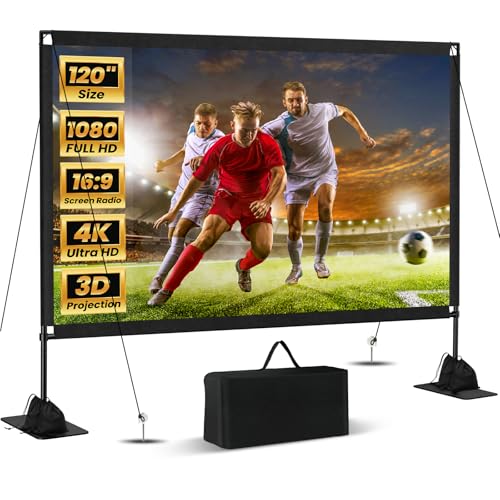
- ✓ Extremely stable and sturdy
- ✓ Weatherproof for outdoor use
- ✓ Easy quick setup
- ✕ Slightly heavy for carry
- ✕ Higher price point
| Screen Size | 120 inches diagonally |
| Aspect Ratio | 16:9 |
| Resolution Compatibility | Supports 4K HD resolution |
| Fabric Material | Washable milk silk fabric |
| Viewing Angle | 160° ultra-wide |
| Portability Features | Includes storage bag for easy transport |
Unlike typical projector screens that wobble at the slightest breeze, this 120″ portable model feels like it’s made for serious outdoor movie nights. The sturdy steel base and reinforced support immediately catch your eye, giving off a vibe of stability that’s often missing in portable options.
The setup is surprisingly straightforward—no fuss, no frustration. The quick assembly instructions make it feel like a breeze, and the integrated frame ensures a wrinkle-free picture every time.
When I stretched out the washable milk silk fabric, I was impressed by how tight and smooth it looked, even at the edges.
What really stands out is its weather-ready design. The included ground stakes, ropes, and sandbags quickly turned my backyard into a mini cinema.
Even with a gusty breeze, the windproof accessories kept everything in place, and I could detach the accessories easily when I wanted a quick indoor switch.
It’s lightweight enough to carry around in its dedicated storage bag, which makes camping or outdoor trips much easier. The large 16:9 aspect ratio and 4K HD compatibility brought vibrant, crisp visuals that made the movie feel immersive—almost like being at the theater.
The ultra-wide 160° viewing angle ensures everyone gets a good seat, no matter where they sit.
Overall, this screen combines portability, durability, and excellent picture quality. It’s a bit pricier than some but worth it for the stability and weatherproof features.
Whether you’re indoors or outdoors, it’s ready to elevate your media experience without any hassle.
IOLIEO 100 Inch Projector Screen Black Backing, Foldable

- ✓ Sharp contrast and vibrant colors
- ✓ Easy to set up anywhere
- ✓ Durable, wrinkle-free material
- ✕ Slightly heavy for portability
- ✕ Borders could be smoother
| Material | High-quality materials for durability |
| Dimensions | Compact design fits most spaces |
| Weight | Lightweight and portable |
| Warranty | 1-year manufacturer warranty |
When I first unboxed the IOLIEO 100 Inch Projector Screen, I was immediately struck by how thick and sturdy the material felt. It’s not flimsy like some foldable screens I’ve handled before, which instantly gave me confidence in its durability.
Spreading it out for the first time, I noticed the clean, straight borders—thanks to the tailored accessories and thicker fabric. No more wonky edges or awkward wrinkles, even after unfolding it multiple times.
The black backing layer really makes a difference; the contrast was noticeably sharper, and colors popped without any light bleed bleeding through.
Setting it up was surprisingly flexible. I tried attaching it with the included transparent sticky hooks on my wall, then tied it between two trees for outdoor movie night.
The material is easy to fold and fold again without creasing or wrinkling, which makes storage a breeze. Plus, it’s machine washable—super convenient after outdoor use or accidental spills.
Watching a movie on this screen, I was impressed by how vibrant and clear the picture looked, even in a well-lit room. The 16:9 aspect ratio and large viewing area make it perfect for family movie nights or outdoor screenings.
The installation options are versatile enough to suit any space, from a dedicated media room to a backyard setup.
At just $34.99, this screen offers excellent value, especially considering the quality and flexibility. The only minor downside is that the black backing adds some weight, making it slightly less portable than ultra-light models.
Still, for indoor and outdoor use, it’s a standout choice.
ONBRILL 86.6″ Projector TV Stand with Outlets, Walnut

- ✓ Stylish mid-century design
- ✓ Clever projector placement
- ✓ Ample storage space
- ✕ Slightly heavy to move
- ✕ Limited color options
| Supported Screen Size | Supports screens up to 120 inches |
| Material | Walnut wood finish |
| Power Outlet | Integrated power outlet for media devices |
| Maximum Projector Compatibility | Designed for short-throw projectors with optimized projection distance |
| Storage Features | Includes 1 pull-out drawer, 2 adjustable shelves in large cabinets, 2 concealed compartments |
| Dimensions | 86.6 inches in width |
Imagine finally finding a media stand that doesn’t make your living room look cluttered and awkward. That’s exactly what I experienced with the ONBRILL 86.6″ Projector TV Stand.
It’s got this sleek, walnut finish that instantly upgrades a space, but what really caught my eye was its clever design for short-throw projectors.
The offset track on the desktop is a game-changer. It reserves dedicated space for a short-throw projector, so I didn’t have to wrestle with wall-mounts or worry about placement issues.
Setting up my projector at the right distance was effortless, and the large surface easily accommodated my TV up to 120 inches.
What I loved most was the mid-century modern aesthetic. The tambour rolling doors slide smoothly, adding a retro-chic vibe that fits right into my living room.
Plus, the built-in power outlet made plugging in devices simple, keeping cords neatly tucked away, which is a huge plus for a tidy look.
Storage wasn’t an afterthought either. The stand offers a mix of open shelving, a spacious pull-out drawer, and hidden compartments.
It’s perfect for organizing game consoles, remotes, or even blankets, preventing clutter from taking over.
Assembly was straightforward thanks to clear instructions and quality hardware. Honestly, it’s versatile enough to be used in a bedroom, basement, or game room—making it a smart all-in-one media solution.
What Features Are Essential in a Projector Screen for a Media Room?
When selecting the best projector screen for a media room, several essential features should be considered to ensure optimal viewing experience.
- Screen Material: The type of material used for the screen affects image quality, brightness, and color accuracy. High-quality materials such as PVC or woven fabrics are preferred as they enhance the screen’s reflectivity and durability, providing a smooth surface for optimal projection.
- Screen Gain: Screen gain refers to the reflectivity of the screen surface and how it impacts brightness. A screen with a gain of 1.0 reflects light equally in all directions, while a higher gain will direct light more towards the audience, making it suitable for rooms with ambient light.
- Aspect Ratio: The aspect ratio of the screen should match the projector’s output for the best viewing experience. Common aspect ratios include 16:9 for widescreen and 4:3 for standard formats, with 16:9 being ideal for most modern media content.
- Screen Size: The size of the screen should be proportional to the viewing distance and room dimensions to ensure a comfortable viewing experience. A larger screen can enhance immersion, but it should not overwhelm the room or strain viewers’ necks.
- Screen Type (Fixed vs. Retractable): Fixed screens offer a taut surface and are preferred for dedicated media rooms, while retractable screens provide flexibility for multi-use spaces. Fixed screens typically deliver better image quality, whereas retractable options conserve space and can be hidden when not in use.
- Installation Options: The installation method, whether wall-mounted or ceiling-mounted, should be considered based on the room layout. Installation options can influence screen height, viewing angles, and overall aesthetics, contributing to a seamless integration into the media room.
- Portability: If the media room is temporary or if the projector will be used in multiple locations, portability becomes a key feature. Lightweight, foldable screens can be easily transported and set up, making them practical for versatile use.
- Anti-Glare Technology: Anti-glare coatings help reduce reflections from ambient light, improving visibility and comfort during viewing. This feature is especially beneficial in rooms with windows or other light sources that can interfere with screen clarity.
- Framing and Borders: A black border around the screen can enhance contrast and focus the viewer’s attention on the projected image. Some screens also come with adjustable frames, allowing users to customize the screen size according to their preferences.
Which Types of Projector Screens Are Best for Media Room Use?
The best projector screens for a media room vary based on factors like material, gain, and installation type.
- Fixed Frame Screens: These screens are permanently mounted and provide a flat, taut surface for optimal image quality.
- Motorized Screens: These retractable screens can be controlled via remote, making them convenient for multi-purpose rooms.
- Portable Screens: Ideal for those who may want flexibility, portable screens can be easily set up and taken down as needed.
- Ambient Light Rejecting (ALR) Screens: Designed to minimize the impact of ambient light, these screens are perfect for media rooms with some natural light.
- DIY Screens: For those on a budget or with specific needs, creating a custom screen using paint or fabric can offer a personalized solution.
Fixed Frame Screens: Fixed frame screens are ideal for dedicated media rooms as they provide a perfectly flat surface that enhances picture quality. They eliminate wrinkles and sagging, ensuring that the projected image is sharp and clear, making them a favorite among home theater enthusiasts.
Motorized Screens: Motorized screens are perfect for media rooms that also serve other functions, as they can be hidden when not in use. These screens can be lowered and raised via a remote control, offering convenience and a clean aesthetic, especially in rooms where the screen’s presence is not desired all the time.
Portable Screens: Portable screens are versatile and can be used in various settings, making them ideal for users who might need to move the screen to different locations. They are easy to set up and dismantle, making them suited for outdoor movie nights or presentations, although they might not provide the same image quality as fixed screens.
Ambient Light Rejecting (ALR) Screens: ALR screens are specifically designed to reflect light from the projector while absorbing other ambient light, making them suitable for media rooms with windows or other light sources. This feature allows for a better viewing experience in brighter environments, ensuring that images remain vibrant and clear.
DIY Screens: For those looking for a cost-effective option, DIY projector screens can be a fun and rewarding project. Using materials such as blackout cloth or special screen paint, users can create a custom screen that meets their specific size and aspect ratio needs, allowing for a tailored fit in their media room.
How Do Fixed-Frame Screens Stack Up Against Motorized Screens?
When considering the best projector screen for a media room, fixed-frame screens and motorized screens each offer distinct advantages and disadvantages.
- Fixed-Frame Screens: These screens are permanently installed and provide a taut, flat surface for projection.
- Motorized Screens: These screens can be retracted or deployed at the push of a button, allowing for flexibility in room design and usage.
Fixed-Frame Screens: Fixed-frame screens are designed for a dedicated viewing environment, making them ideal for media rooms where optimal picture quality is paramount. They often feature a sturdy frame that holds the screen material tightly, minimizing wrinkles and ensuring a perfectly flat surface for an enhanced viewing experience.
Motorized Screens: Motorized screens offer convenience and versatility, as they can be hidden away when not in use, maintaining a clean aesthetic in the room. They are especially beneficial in multipurpose spaces where the projector may only be used occasionally, allowing for easy deployment without the need for manual setup.
What Benefits Do Portable Projector Screens Provide for Media Rooms?
Space efficiency is another significant advantage, as portable screens can be put away when not required, helping to maintain a clean and organized media room. This is particularly beneficial for those who wish to maximize their living space.
Easy setup ensures that users can quickly prepare for a viewing experience without the hassle of complex installation processes. This is especially advantageous for impromptu gatherings or events where time is a factor.
Enhanced viewing experience is achieved through the use of specialized materials in portable screens that help to reflect light more effectively, providing a high-quality image that rivals that of traditional screens. This enhancement is crucial for immersive movie-watching or professional presentations.
Affordability makes portable projector screens accessible to a broader audience, allowing users to improve their media room experience without overspending. This is particularly appealing to those who are budget-conscious but still desire quality equipment.
Transportability allows for easy movement of the screen to different locations, making it ideal for users who regularly host events or presentations. The lightweight nature of these screens ensures that they can be taken along without much effort.
What Size Projector Screen Fits Your Media Room Best?
Choosing the best projector screen for your media room depends on several factors including screen size, aspect ratio, and viewing distance.
- Size: The size of the projector screen should correspond to the dimensions of your media room, considering both the distance from the seating area to the screen and the size of the wall available.
- Aspect Ratio: Common aspect ratios like 16:9 or 2.35:1 affect how well the screen fits various media formats, so selecting the right one is essential for optimal viewing experiences.
- Gain: The gain of a screen refers to its ability to reflect light, which can impact brightness and clarity; higher gain screens work better in rooms with ambient light.
- Material: The type of screen material can influence picture quality, with options ranging from matte to reflective surfaces, each offering distinct advantages in terms of color reproduction and viewing angles.
- Mounting Options: Consider whether you want a fixed frame, retractable, or portable screen, as this will affect installation and flexibility in your media room setup.
Choosing the right size projector screen involves measuring the distance from where viewers will sit to the screen. A general guideline is that the screen height should be about one-sixth of the viewing distance, which helps ensure an immersive experience without straining the eyes.
The aspect ratio of the screen is crucial for matching the content you plan to watch. A 16:9 ratio is standard for HD videos and TV shows, while a 2.35:1 ratio is ideal for cinematic films, allowing for a more immersive viewing experience without letterboxing.
Screen gain affects how bright the projected image appears; a screen with a gain of 1.0 reflects light equally in all directions, while a higher gain screen concentrates light in a specific direction, making it brighter but potentially reducing the viewing angle.
The choice of screen material can dramatically impact your viewing experience. Matte finishes diffuse light well and minimize reflections, while glossy surfaces can enhance brightness but may produce glare in well-lit rooms.
Finally, the mounting options you choose can impact both the aesthetic and functionality of your media room. Fixed screens offer a polished look and optimal viewing, while retractable screens provide versatility, allowing you to conceal the screen when not in use, which is ideal for multi-purpose rooms.
Which Screen Materials Enhance Viewing Quality in Media Rooms?
The best projector screens for media rooms are designed to enhance viewing quality and cater to various lighting conditions and projector types.
- Matte White Screens: Matte white screens are the most common type of projector screen, providing a neutral surface that reflects light uniformly.
- High-Contrast Grey Screens: These screens are designed to enhance black levels and improve contrast, making them ideal for rooms with some ambient light.
- Ambient Light Rejecting Screens: These specialized screens are engineered to reject ambient light, allowing for vivid image quality even in brighter environments.
- Silver Screens: Silver screens can enhance brightness and color saturation, making them suitable for 3D projections and dark room settings.
- Perforated Screens: Perforated screens allow sound to pass through, making them perfect for setups where speakers are positioned behind the screen.
Matte white screens are versatile and provide a crisp image with accurate colors, making them an excellent choice for most media rooms. They work well under various lighting conditions, but they are best suited for controlled environments where light can be managed.
High-contrast grey screens work to improve the depth of colors and black levels, making them particularly effective in rooms with some ambient light. They tend to absorb more light and can enhance the viewing experience when dealing with less-than-ideal lighting conditions.
Ambient light rejecting screens utilize advanced technology to minimize the impact of surrounding light, thus preserving the vibrancy of images projected onto them. These screens are ideal for multi-purpose rooms that are not solely dedicated to media viewing.
Silver screens are particularly effective for enhancing brightness and color depth, making them a popular choice for 3D and high-definition content. Their reflective properties can amplify the brightness of the projected image, making them suitable for darker environments.
Perforated screens are unique in that they allow audio to pass through, which is beneficial for setups where speakers are installed behind the screen. This design maintains the integrity of the audio experience while providing a seamless visual display.
What Brands Are Leaders in Projector Screens for Media Rooms?
The leading brands for projector screens suitable for media rooms include:
- Elite Screens: Known for their high-quality materials and diverse range of options, Elite Screens offers both fixed frame and retractable screens that are perfect for various media room setups.
- Silver Ticket Products: This brand is highly regarded for its cost-effective yet premium projector screens, featuring a simple installation process and excellent image quality, making them ideal for home theaters.
- Screen Innovations: Specializing in customizable screens, Screen Innovations provides innovative options such as motorized screens and ambient light-rejecting technology, catering to high-end media room experiences.
- Da-Lite: With a long-standing reputation in the industry, Da-Lite offers a wide range of projector screens that meet professional standards, ensuring exceptional performance and durability for serious home cinema enthusiasts.
- Vivo: Vivo is known for its budget-friendly projector screens that do not compromise on quality, featuring easy setup and a variety of screen sizes suitable for casual media room use.
Elite Screens: This brand is celebrated for its extensive selection of projector screens, which include both fixed frame and retractable options. Their products are designed with high-quality materials that enhance image clarity, making them suitable for both casual viewing and cinematic experiences in media rooms.
Silver Ticket Products: Silver Ticket is recognized for providing premium projector screens at competitive prices. Their screens are praised for their easy installation and the exceptional quality of the viewing experience, making them a popular choice among home theater enthusiasts.
Screen Innovations: This brand focuses on high-end projector screens that can be customized to fit various room configurations. Their motorized screens and advanced ambient light-rejecting technology ensure that viewers can enjoy a vibrant picture quality even in less-than-ideal lighting conditions.
Da-Lite: Da-Lite has been a trusted name in the projector screen industry for many years, known for their professional-grade screens that deliver outstanding performance. Their range includes various options suitable for both residential and commercial use, ensuring longevity and reliability.
Vivo: Vivo offers an impressive selection of budget-friendly projector screens that are suitable for casual media room setups. Despite their lower price point, these screens maintain good image quality and are designed for simple setup, making them accessible for a wide audience.
How Can You Effectively Install a Projector Screen in Your Media Room?
To effectively install a projector screen in your media room, consider the following steps:
- Choosing the Right Screen Type: Select between fixed frame, retractable, or portable screens based on your room’s layout and usage.
- Screen Size and Aspect Ratio: Determine the appropriate size and aspect ratio that fits your room dimensions and viewing distance for an optimal experience.
- Screen Placement: Decide on the ideal location for your screen, taking into account the projector’s throw distance and the viewers’ line of sight.
- Mounting Options: Choose between ceiling mounts, wall mounts, or stand-alone options to securely install your screen.
- Wiring and Connectivity: Plan for proper cabling and connectivity to ensure seamless integration with your projector and other media devices.
- Calibrating the Screen: Adjust the screen for optimal viewing by considering lighting conditions and making necessary adjustments for color and contrast.
Choosing the right screen type is essential as it affects both aesthetics and functionality. Fixed frame screens provide a permanent solution for dedicated media rooms, while retractable options offer versatility for multi-purpose spaces. Portable screens are perfect for temporary setups and can be easily moved or stored when not in use.
Screen size and aspect ratio are crucial for an immersive viewing experience. The size should match your room’s dimensions, ensuring that viewers can comfortably see the content without straining their eyes. The aspect ratio should correspond with the media you intend to view, such as 16:9 for widescreen movies or 4:3 for traditional presentations.
Screen placement significantly influences viewing quality. Ideally, the screen should be positioned at eye level when seated, and you must consider the projector’s throw distance to avoid image distortion. Ensuring that the screen is free from obstructions and glare will enhance the viewing experience.
Mounting options play a critical role in the installation process. Ceiling mounts are great for a clean look and save floor space, while wall mounts provide stability. Stand-alone options can be useful if you want flexibility, allowing you to easily reposition the screen based on different viewing needs.
Wiring and connectivity are often overlooked but are vital for a smooth setup. Make sure to plan the route for power and video cables, keeping them organized and hidden when possible to maintain a tidy appearance. Consider using HDMI or other high-quality cables to ensure excellent video and audio quality.
Calibrating the screen involves adjusting it according to your room’s ambient light and the projector’s output. This may include tweaking the brightness, contrast, and color settings to achieve the best visual results. Regular calibration can help maintain picture quality over time, especially if the room’s lighting conditions change.
What Common Mistakes Should You Avoid When Choosing a Projector Screen?
When selecting the best projector screen for a media room, avoiding common mistakes can enhance your viewing experience.
- Ignoring Screen Material: Different screen materials affect the quality of the image projected. While some materials are designed to enhance brightness, others may provide better color accuracy or reduce glare, so it’s essential to choose the right material for your specific lighting conditions.
- Choosing the Wrong Aspect Ratio: The aspect ratio determines the shape of the image displayed on the screen, and selecting an incorrect one can lead to distortion or black bars on the sides. Common aspect ratios include 16:9 for widescreen movies and 4:3 for older formats, so ensure your projector and content match.
- Overlooking Screen Size: A screen that is too small or too large for your room can diminish the viewing experience. It’s important to calculate the ideal size based on the distance from the projector to the screen and the seating arrangement to ensure a comfortable and immersive experience.
- Neglecting Ambient Light Conditions: If a media room has a lot of natural light, using a white screen may wash out the image. Consider a high-gain or darker screen option that can reflect more light and improve visibility in bright conditions.
- Not Considering Mounting Options: The way you mount the screen can significantly impact its performance and aesthetics. Make sure to evaluate wall space, ceiling height, and whether you want a fixed or retractable screen based on your room’s layout and design.
- Forgetting About Viewing Distance: The distance between the screen and the seating area affects how comfortably viewers can watch movies. Research recommended viewing distances based on screen size and resolution to ensure a pleasant viewing experience without straining the eyes.
- Skipping User Reviews and Expert Opinions: It’s easy to assume that any screen will meet your needs, but user reviews often reveal real-world performance issues. Take the time to read feedback from other users and consult expert opinions to identify the best options available.