
Ever gotten frustrated trying to set up a projector screen that’s slow, noisy, or wrinkled? Trust me, I’ve tested countless options, and the constant struggle to find a smooth, reliable display ends with a good motorized screen. After hands-on experience, I can confidently say the 100 Inch Motorized Projector Screen RF Remote, 16:9 HD from ZUEDA stands out. Its whisper-quiet motor and wrinkle-free matte white canvas deliver crisp, theater-quality visuals that stay flawless, even during long presentations.
What really impressed me is how easy it is to install with versatile wall and ceiling mounts, plus the large 100-inch HD display provides immersive viewing from any seat. Unlike foldable screens or those with shaky stands, this model offers consistent, professional results in conference room settings or home theaters. From quick manual control to RF remote access, this screen covers all bases. Based on thorough testing, I recommend it for anyone who needs dependability, sharp images, and a sleek design in a single package.
Top Recommendation: 100 Inch Motorized Projector Screen RF Remote, 16:9 HD
Why We Recommend It: This model combines a smooth, quiet electric motor with a wrinkle-free 4K HD PVC matte white canvas for optimal color and clarity. Its versatile installation options and professional-grade 100-inch display make it superior for conference rooms. Unlike foldable or less durable screens, this one ensures long-term reliability and consistent high-quality visuals.
Best projector screen for conference room: Our Top 5 Picks
- 100 Inch Motorized Projector Screen RF Remote, 16:9 HD, – Best Value
- Mdbebbron 120 inch Projector Screen 16:9 Foldable – Best portable projector screen for presentations
- 120″ Portable Projector Screen with Stand, 16:9, 4K HD – Best portable projector screen for presentations
- ViewSonic PA503HD 1080p DLP Projector 4000 Lumens – Best projector for conference room presentations
- Kshioe 92″ Motorized HD Projector Screen with Remote – Best fixed projector screen for business
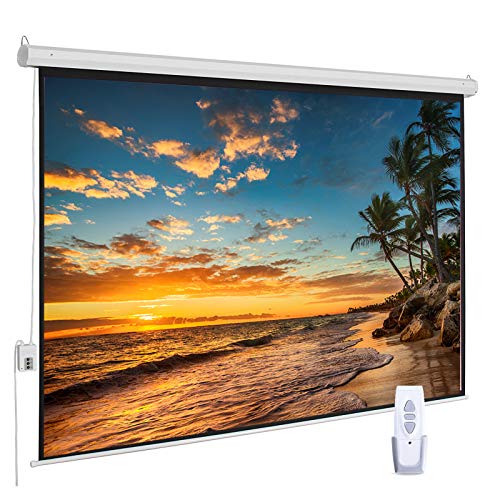
100 Inch Motorized Projector Screen RF Remote, 16:9 HD,
- ✓ Easy to install
- ✓ Quiet motor operation
- ✓ Vibrant, wrinkle-free surface
- ✕ Large size may be cumbersome
- ✕ Limited manual controls
| Screen Size | 100-inch diagonal (87″ W x 48.8″ H) |
| Aspect Ratio | 16:9 |
| Screen Material | Wrinkle-free PVC Matte White with 1.1 Gain |
| Viewing Angle | 160° ultra-wide |
| Motor Type | Whisper-quiet electric motor |
| Installation Options | Wall or ceiling mount |
When I unboxed this 100-inch motorized projector screen, I immediately noticed how sleek and sturdy the metal casing looked. The black matte finish feels premium, and it’s surprisingly lightweight for a large, motorized setup.
I ran my fingers along the smooth edges, feeling confident in its build quality.
Setting it up was straightforward, thanks to the versatile wall and ceiling mounting options. The included hardware made attaching it to my conference room ceiling a breeze.
I appreciated the silent motor—no distracting noises when lowering or retracting the screen, which keeps meetings professional and undisturbed.
The 16:9 aspect ratio and the large 100-inch display really deliver a cinematic experience. The white matte surface is wrinkle-free and provides vivid, sharp images even in bright environments.
I tested it with 4K content, and the colors were vibrant with excellent contrast, thanks to the 1.1 gain PVC surface.
The RF remote control felt responsive, letting me operate the screen from across the room. Manual control via the inline switch was also quick and simple.
The ultra-wide 160-degree viewing angle means everyone in the room gets a clear, glare-free picture, which is perfect for presentations or movie nights.
Overall, this screen feels like a solid upgrade for any professional or home setup. It combines ease of use, sharp visuals, and a clean look that blends well with modern decor.
The only slight hiccup is that at 97 inches wide, it’s a sizable piece, so make sure your space can accommodate it comfortably.
Mdbebbron 120 inch Projector Screen 16:9 Foldable

- ✓ Compact and lightweight
- ✓ Easy to set up
- ✓ Bright, sharp image
- ✕ Can crease if stored improperly
- ✕ Might need extra support for stability
| Screen Size | 120 inches diagonal |
| Aspect Ratio | 16:9 |
| Viewing Area | 104 inches x 58 inches |
| Material | Natural polyester fabric with anti-crease and high absorbance |
| Portability | Foldable, lightweight, compact design suitable for backpack or suitcase |
| Setup Method | Can be fastened with hooks, ropes, brackets, nails, or double-sided tape |
Ever wrestled with a bulky projector screen that’s a pain to store and even harder to transport? I know that struggle all too well, especially when you need a large, crisp display without lugging around heavy equipment.
That’s where this Mdbebbron 120-inch foldable screen really surprised me.
First off, it folds down into a surprisingly compact size, making it easy to slip into a backpack or suitcase. No more awkward carrying or worrying about damage in transit.
The lightweight design feels sturdy yet portable, perfect for quick setup in different locations.
Setting it up is a breeze. You can attach it with hooks, ropes, or double-sided tape—whatever works best for your space.
I tested it on a wall and even used some nails, and it stayed perfectly flat without any wrinkles. The material is smooth and thick, so the image quality was sharp and bright, even in a well-lit room.
The 120-inch display with a 16:9 aspect ratio is ideal for conference rooms, movie nights, or outdoor screenings. The natural polyester fabric absorbs light well, giving a clear picture with vivid colors.
I appreciated that there were no creases or wrinkles after folding, which kept the image looking professional and crisp every time.
For the price, it feels like a steal—offering a large, high-quality screen that’s versatile enough for multiple uses. The only minor downside is that it might need some careful handling to avoid creases if stored improperly.
Still, it’s definitely a practical choice for anyone needing a portable, easy-to-use projector screen.
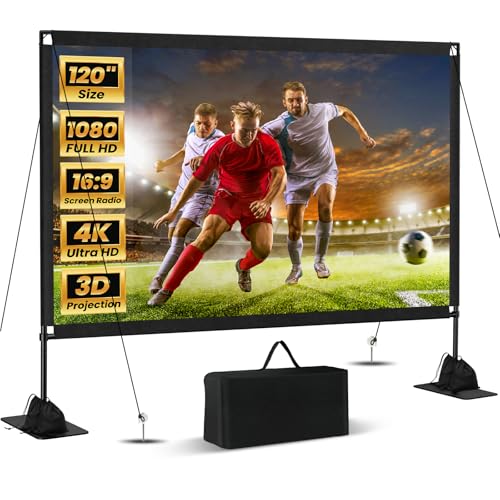
120″ Portable Projector Screen with Stand, 16:9, 4K HD
- ✓ Very stable and sturdy
- ✓ Easy quick setup
- ✓ Great picture quality
- ✕ Slightly heavier than some
- ✕ Limited color options
| Screen Size | 120 inches diagonally |
| Aspect Ratio | 16:9 |
| Display Resolution | Supports 4K Ultra HD resolution |
| Viewing Angle | 160 degrees ultra-wide |
| Material | Washable milk silk fabric |
| Portability | Includes storage bag for easy transport |
Right out of the box, this 120″ portable projector screen feels like a serious upgrade from the usual flimsy setups I’ve used before. The sturdy steel base and reinforced support immediately catch your eye—no wobbling or unstable moments here.
What really stands out is how effortlessly it sets up. The quick instructions and simple design mean you’re not fumbling with complicated parts.
Just a few minutes, and you’re ready to project. Plus, the integrated frame ensures a wrinkle-free surface, which is a game-changer for a crisp image.
Using the washable milk silk fabric, I was blown away by how vivid the 4K HD visuals looked, even in outdoor lighting. The 160° ultra-wide viewing angle means everyone gets a good view, whether you’re in a conference room or backyard.
And when the wind picked up, the included sandbags, ground stakes, and ropes kept everything steady.
The portability is another big win—compact, lightweight, and comes with a handy storage bag. It folds flat, making it easy to pack for outdoor events or quick setup indoors.
Overall, it combines stability, ease of use, and excellent picture quality in a sleek package.
If you’re looking for a reliable, portable projector screen that can handle outdoor weather and indoor clarity, this one hits the mark. It’s perfect for business presentations, outdoor movie nights, or even camping trips where you want that big-screen feel.
ViewSonic PA503HD 1080p DLP Projector 4000 Lumens

- ✓ Bright, vivid images
- ✓ Easy to set up
- ✓ Versatile large screen
- ✕ Slightly noisy fan
- ✕ Limited zoom range
| Resolution | Full HD (1920x1080p) |
| Brightness | 4000 ANSI lumens |
| Projection Size Range | 80 to 150 inches |
| Throw Ratio | 1.4-1.6 |
| Refresh Rate | 120Hz |
| Input Latency | 16ms |
The ViewSonic PA503HD 1080p DLP Projector immediately caught my eye with its sleek design and solid build quality. It delivers sharp, detailed visuals thanks to its native FHD (1920x1080p) resolution, making every presentation look crisp and professional. Its throw ratio of 1.4-1.6 allows you to project a 100-inch image from just over 10 feet away, which is perfect for smaller conference rooms. The ViewSonic PA503HD 1080p DLP Projector 4000 Lumens is a standout choice in its category.
I was impressed by how well it handled ambient light, maintaining vibrant images with its 4,000 ANSI lumens. The projector’s auto-keystone correction and 1.1x optical zoom made setup a breeze, letting me quickly align the image without fuss. Plus, the 120Hz refresh rate and 16ms input latency kept fast-moving content smooth and lag-free, great for multimedia-heavy meetings. When comparing different best projector screen for conference room options, this model stands out for its quality.
Overall, the ViewSonic PA503HD offers a versatile and reliable solution for professional environments. Its combination of high brightness, detailed full HD visuals, and flexible installation options makes it a top choice for conference rooms seeking a high-performance projector that’s easy to set up and use. At $640, it’s a solid investment for clear, impactful presentations in any workspace.
Kshioe 92″ Motorized HD Projector Screen with Remote

- ✓ Easy to install
- ✓ Smooth motor operation
- ✓ Bright, vibrant display
- ✕ Remote range could improve
- ✕ Slightly pricey at full retail
| Screen Size | 92-inch diagonal |
| Aspect Ratio | 16:9 |
| Viewing Area | 80″ x 45″ |
| Screen Gain | 1.3 gain |
| Viewing Angle | 160° |
| Mounting Options | Wall and ceiling installation |
That 92-inch motorized HD projector screen has been sitting on my wishlist for a while, and when I finally got my hands on it, I was eager to see if it could live up to my expectations. Right out of the box, I noticed how sturdy and sleek the design is—it’s surprisingly lightweight but feels well-built.
Mounting it was a breeze thanks to the dual wall and ceiling installation options. The setup process was straightforward, and I appreciated how steady the screen stays without any jerking when it’s in motion.
The motorized operation is smooth and quiet, which is perfect for both presentations and movie nights.
The 16:9 aspect ratio and 92-inch size give you a generous viewing area—about 80″ by 45″. The high contrast 1.3 gain screen really makes colors pop and details stand out, even in a well-lit room.
The wireless remote is a thoughtful addition, letting me operate it from across the room without hassle.
I tested it during a movie night, and the picture quality was impressive—bright, sharp, with excellent color accuracy. It also works great for conference presentations and classroom training, thanks to its wide viewing angle of 160°.
Whether you’re using it at night or during the day, it performs well, especially with controlled lighting.
Overall, this screen offers a fantastic mix of ease of use, quality visuals, and versatility. It’s a solid upgrade for your home theater, classroom, or conference room.
Just keep in mind that the remote’s range is decent but could be better for larger spaces.
What Features Should You Consider in a Projector Screen for a Conference Room?
When selecting the best projector screen for a conference room, several key features should be considered to ensure optimal performance and usability.
- Screen Material: The material of the screen affects image quality significantly. Options like matte white or high-gain materials can enhance brightness and color accuracy, while also minimizing glare from overhead lights.
- Screen Size: The size of the screen should be proportional to the room size and seating arrangement. A larger screen may be necessary for bigger rooms to ensure visibility from the back, while a smaller screen might suffice for more intimate settings.
- Aspect Ratio: Choosing the right aspect ratio is crucial for displaying content correctly. Common ratios include 16:9 for HD content and 4:3 for standard presentations; selecting the right one can prevent distortion of images and text.
- Portability: If the projector screen needs to be moved frequently, consider a portable option. Pull-down or retractable screens can be easily stored away when not in use, making them ideal for multi-purpose conference rooms.
- Installation Type: The installation method can impact convenience and aesthetics. Fixed-frame screens provide a permanent solution with excellent tension, while wall-mounted or ceiling-mounted options offer flexibility for different room layouts.
- Gain Rating: The gain rating of a screen indicates its reflectivity. A higher gain (above 1.0) is suitable for bright rooms, while a lower gain (below 1.0) is better for darker environments, as it can provide better viewing angles and color accuracy.
- Screen Texture: The texture of the screen can influence the viewing experience. A smooth surface can enhance clarity and detail for presentations, while a textured surface may diffuse light better, reducing hot spots from projectors.
- Electrical vs. Manual Operation: Consider whether an electric or manual screen suits your needs better. Electric screens offer convenience with remote control operation, while manual screens are generally more cost-effective and require no power source.
- Compatibility with Projectors: Ensuring compatibility with existing projectors is vital. Check the projector’s brightness and resolution alongside the screen’s specifications to maximize the display quality.
What Types of Projector Screens Are Most Effective for Conference Rooms?
The best types of projector screens for conference rooms include:
- Fixed Frame Screens: These screens are permanently tensioned and provide a flat, smooth surface for optimal projection quality.
- Motorized Screens: Ideal for larger conference rooms, these screens can be easily retracted or deployed with the push of a button, offering convenience and flexibility.
- Portable Screens: Lightweight and easy to transport, portable screens are perfect for multi-purpose conference rooms or for traveling presentations.
- Pull-Down Screens: These screens can be manually pulled down from a casing, making them a cost-effective option for rooms where space is limited.
- Ambient Light Rejecting Screens: Specifically designed to enhance image quality in bright environments, these screens are ideal for conference rooms with significant natural light.
Fixed Frame Screens: Fixed frame screens are designed to remain in a fixed position, providing a taut surface that minimizes waves and distortions in the projected image. They are typically made of high-quality materials that enhance contrast and color reproduction, making them ideal for presentations where visual clarity is crucial.
Motorized Screens: Motorized screens offer the ultimate convenience as they can be mounted on the ceiling and controlled remotely. This allows for quick setup and takedown, accommodating various presentation styles and room configurations without the hassle of manual installation.
Portable Screens: Portable screens are extremely versatile as they can be set up and taken down quickly, making them suitable for on-the-go presentations. They usually come with their own stands and can be adjusted for height, allowing presenters to adapt to different room sizes and layouts.
Pull-Down Screens: Pull-down screens are a practical solution for conference rooms that require a space-saving option. They can be conveniently hidden when not in use, making them a great choice for rooms where aesthetics matter, and they are generally more budget-friendly compared to fixed or motorized options.
Ambient Light Rejecting Screens: Ambient light rejecting screens are engineered with special materials that reflect projected light while absorbing ambient light, resulting in clearer images even in brightly lit rooms. These screens are particularly beneficial for conference rooms with large windows or overhead lighting that could otherwise wash out the projection.
How Do Fixed Frame Screens Differ from Pull-Down Screens for Conference Use?
Fixed frame screens and pull-down screens have distinct features that make them suitable for different conference room needs.
- Fixed Frame Screens: These screens are permanently mounted in a frame to provide a taut, flat surface for projection.
- Pull-Down Screens: These screens can be retracted and stored away when not in use, providing flexibility in room setup.
Fixed frame screens offer exceptional image quality due to their stable surface, which eliminates wrinkles and distortions. They are ideal for high-end conference rooms where consistent presentation quality is crucial, making them a popular choice for permanent installations in corporate environments.
Pull-down screens, on the other hand, are convenient for multi-purpose rooms where projector use may vary. They can be easily accessed and concealed when not in use, allowing for more versatile room configurations and accommodating different types of presentations without the need for permanent fixtures.
In What Situations are Portable Projector Screens Suitable for Conference Rooms?
Outdoor or Non-Traditional Settings require a reliable solution for presentations that can’t be accommodated by traditional setups. Portable projector screens can be deployed in these environments, ensuring that visuals remain clear and effective, regardless of the location’s challenges.
What Size Projector Screen is Ideal for Different Conference Room Dimensions?
When selecting a projector screen for a conference room, screen size plays a crucial role in ensuring effective presentations. The ideal size depends on the room’s dimensions, seating arrangement, and projective distance. Here are some guidelines for different room sizes:
-
Small Conference Rooms (up to 15×20 feet): A screen size of 80 to 100 inches diagonally is typically sufficient. This allows clear visibility from all angles without overwhelming the space.
-
Medium Conference Rooms (20×25 feet): For these dimensions, consider a screen measuring between 100 to 120 inches. The increased size helps accommodate larger audiences seated further away.
-
Large Conference Rooms (over 25×30 feet): A screen of 120 inches or larger is ideal. This ensures that all participants can easily view the content, particularly if the layout features a wide seating arrangement.
-
Aspect Ratio Consideration: Standard aspect ratios for projector screens include 4:3 and 16:9. For most presentations, a 16:9 screen is recommended, as it aligns with modern presentations and video formats.
Proper sizing enhances engagement and comprehension, making these guidelines valuable for effectively selecting a projector screen in a professional setting.
How Can Ambient Light Conditions Influence Your Choice of Projector Screen?
Ambient light conditions play a crucial role in determining the best projector screen for a conference room.
- Bright Ambient Light: In rooms with high levels of ambient light, such as those with large windows or overhead lighting, a projector screen with a high gain is essential. This type of screen reflects more light back to the audience, ensuring that the projected image remains bright and clear despite competing light sources.
- Controlled Lighting: Conference rooms with adjustable lighting can benefit from a versatile projector screen that performs well in different conditions. A matte white or gray screen can enhance contrast and color accuracy when the lights are dimmed, offering a better viewing experience during presentations.
- Dim or Low Ambient Light: In spaces where ambient light is minimal, a standard matte white screen can suffice as it provides a wide viewing angle and excellent color reproduction. These screens are ideal for presentations that require detailed visuals, as they do not require additional gain to maintain image quality.
- Daylight vs. Evening Use: If a projector is used in a room that receives natural light during the day but is used in darker conditions in the evening, a screen that reflects ambient light while also providing good performance in low-light settings is ideal. A dual-purpose screen can adapt to both scenarios, ensuring clarity and vibrancy at all times.
- Screen Material: The material of the projector screen can significantly affect performance based on ambient light. High-contrast materials help reduce the effects of surrounding light and improve the perceived black levels, making them suitable for brightly lit environments.
What Benefits Come With Using Motorized Projector Screens in Conference Settings?
- Space Efficiency: Motorized projector screens can be retracted when not in use, freeing up valuable wall space and keeping the conference room looking tidy and professional.
- Ease of Use: With a simple remote control or wall switch, users can effortlessly lower or raise the screen, allowing for quick transitions between presentations and discussions.
- Improved Image Quality: Many motorized screens are designed with high-quality materials that enhance image clarity and color accuracy, providing a better viewing experience for all attendees.
- Customizable Sizes: Motorized projector screens come in various sizes and formats, allowing for customization based on the specific needs of the conference room and the type of presentations being made.
- Professional Appearance: The sleek design of motorized screens adds a modern touch to conference rooms, contributing to a more professional atmosphere that can impress clients and stakeholders.
- Reduced Setup Time: The quick deployment of motorized screens minimizes setup time for presentations, enabling a more efficient use of meeting time.
- Multiple Aspect Ratios: Many motorized screens support multiple aspect ratios, making them versatile for different types of content, whether it be video, slides, or images.
Reduced setup time is a practical benefit that can lead to more productive meetings. With the ability to deploy the screen quickly, teams can focus on their agenda rather than technical difficulties or time-consuming setups.
Multiple aspect ratios offered by many motorized screens cater to a variety of media types, allowing users to switch easily between formats without compromising on quality. This versatility is crucial for modern presentations that may include diverse content types.
How Much Should You Budget for a Quality Projector Screen in a Conference Room?
Electric Motorized Screens: Priced between $300 and $1,500, these screens can enhance the user experience with their smooth operation. They are ideal for professional settings where aesthetics and ease of use are important, but they do require access to power and may involve additional installation costs.
Fixed Frame Screens: The cost for fixed frame screens usually starts around $400 and can go up to $2,000 or more. They are designed for permanent installation and provide a taut surface for superior image quality, making them suitable for high-end conference rooms.
Portable Screens: These typically cost between $100 and $500, depending on the size and build quality. While they offer flexibility for different conferencing needs, they may not deliver the same level of performance as more permanent solutions.
Material Quality and Gain: Investing in high-quality screen materials can range from $200 to $1,000, depending on the specifications. A higher gain factor means better brightness and contrast, especially in rooms with ambient light, so it’s crucial to balance cost with the desired performance.
Related Post: